
An AI face scanner can add visual beauty analysis and personalized skincare product discovery to a beauty, skincare, cosmetics, or retail app. Customers capture facial images, AI evaluates supported visible cosmetic concerns, and the results can guide users toward relevant products, routines, or other personalized experiences. Skinive Face Scanner currently supports Web SDK and API integration, while native iOS and Android SDKs are planned.
Key Takeaways
- AI face scanning gives beauty and skincare apps a visual personalization layer that can complement quizzes, customer profiles, purchase history, and browsing behavior.
- A face scan can evaluate supported visible cosmetic concerns such as fine lines, pores, blackheads, pigmentation, dark spots, redness, and uneven-looking texture.
- The strongest mobile experience connects face-analysis results with a useful next step, such as product discovery, a skincare routine, relevant content, or another personalized beauty feature.
- Skinive Face Scanner currently supports Web SDK and API integration. Native iOS and Android SDKs are planned.
- Beauty brands and retailers can connect their existing skincare catalogs using product data supplied in CSV or XML format.
- Face Scanner performance should be evaluated across the wider app journey, not only by the number of completed scans.
- Skinive Face Scanner is designed for beauty, cosmetics, and personalized skincare experiences rather than medical diagnosis.
Why Add an AI Face Scanner to a Beauty or Skincare App?
An AI face scanner gives a beauty app a visual source of personalization. Instead of relying only on information customers enter manually or generate through shopping behavior, the app can use facial images to evaluate supported visible cosmetic concerns and help determine what the customer should explore next.
Beauty apps may already know which products a customer has purchased, which categories they browse, what they selected during onboarding, or which products they have saved.
What they may not have is a simple visual input related to the customer’s current facial beauty concerns.
Face scanning adds that layer.
A typical mobile journey can look like:
- The customer starts a face scan.
- Facial images are captured.
- AI evaluates supported visible cosmetic concerns.
- Results are presented in a clear beauty-focused format.
- The app connects the results with relevant products, routines, content, or another personalized experience.
- The business measures what customers do next.
For beauty brands and retailers, the value therefore comes from more than the scan itself. The important product-design question is what the app does with the analysis afterwards.
What Is an AI Face Scanner for a Mobile Beauty App?
An AI face scanner for a mobile beauty app is a computer-vision feature that analyzes facial images for supported visible cosmetic characteristics and returns structured results that can be used within a digital beauty experience.
Face scanning can be incorporated into different types of mobile products, including:
- Beauty brand apps
- Skincare apps
- Cosmetics retailer apps
- Loyalty apps
- Personalized skincare experiences
- Routine builders
- Assisted-selling applications
- Omnichannel beauty platforms
Skinive Face Scanner can evaluate supported visible cosmetic characteristics including:
- Fine lines and wrinkles
- Visible or enlarged pores
- Blackheads and whiteheads
- Acne-related imperfections and blemishes
- Dark spots and pigmentation
- Redness
- Uneven-looking facial texture
- Other supported visible cosmetic characteristics
The results can then become one input for personalized product discovery or another beauty experience inside the app.
Skinive Face Scanner is intended for beauty, cosmetics, and personalized skincare use. It should not be presented as a medical diagnostic feature or as a replacement for professional healthcare advice.
How Does AI Face Scanning Work Inside a Mobile App?
AI face scanning inside a beauty app can follow a short journey from image capture to personalized action. With Skinive Face Scanner, users capture front, left, and right facial images, AI evaluates supported visible cosmetic concerns, and the app can connect the results with relevant next steps.
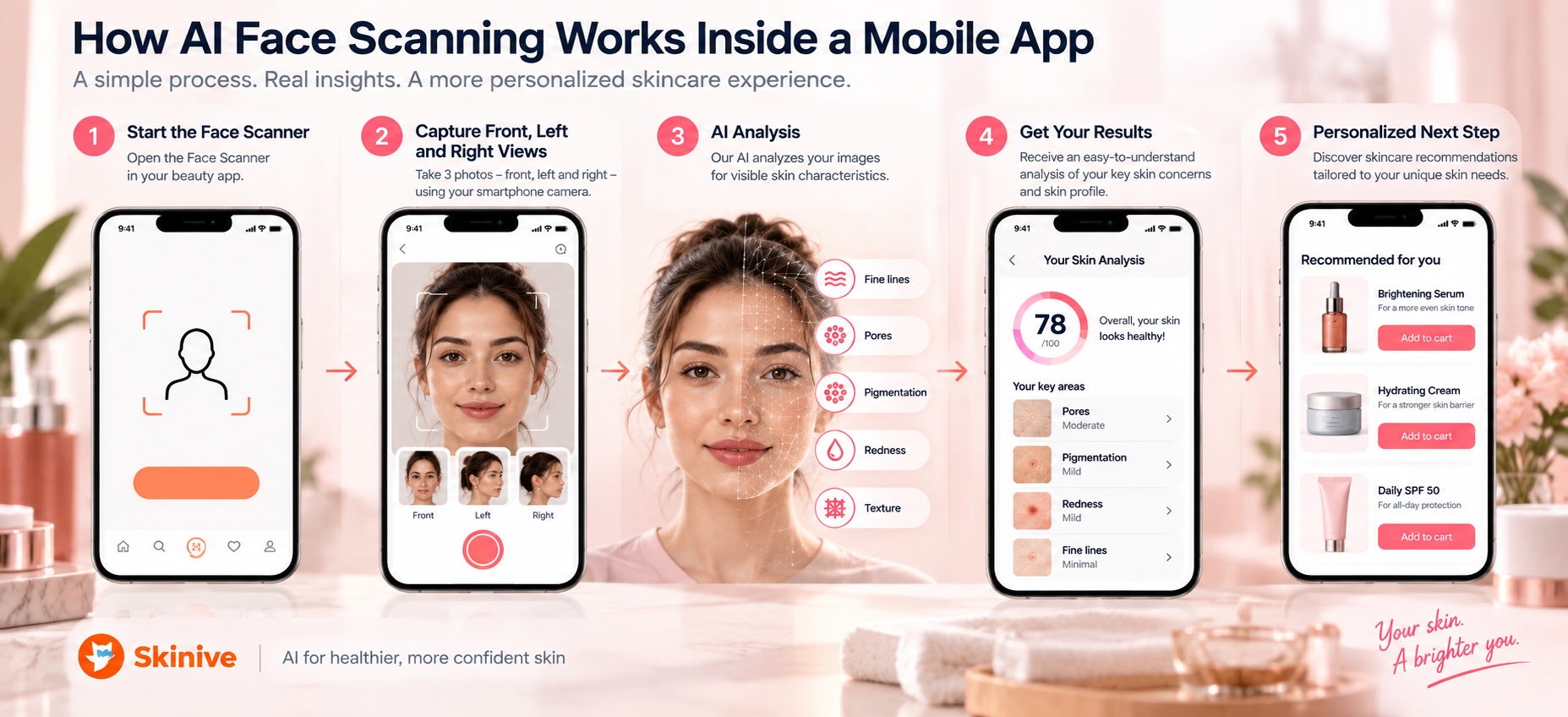
1. Start the Face Scanner
The customer enters the Face Scanner from an appropriate point in the app.
This might be during onboarding, inside a personalized skincare section, from product discovery, or as part of another beauty experience where visual personalization is useful.
Before requesting camera interaction, the app should explain what the feature does and what the customer will receive.
2. Capture Front, Left, and Right Facial Images
With Skinive Face Scanner, the customer captures three views:
- Front
- Left
- Right
These images provide different perspectives of the face for analysis.
The capture interface should keep instructions simple and make it clear how the customer should position their face.
3. Analyze Supported Visible Cosmetic Concerns
AI evaluates the facial images for supported visible characteristics such as fine lines, pores, blackheads, pigmentation, redness, and uneven-looking texture.
The technical analysis should then be translated into an understandable beauty experience rather than exposing raw model output to the customer.
4. Present a Useful Next Step
The scan should lead somewhere.
Depending on the app, the customer might continue to:
- Relevant skincare products
- Personalized product discovery
- A skincare routine
- Beauty content related to visible concerns
- Relevant product categories
- Another personalized feature
The exact next step should reflect the purpose of the app.
5. Measure the Wider Customer Journey
Face scanning should be treated as part of the app funnel rather than as an isolated interactive feature.
Businesses can evaluate whether customers complete scans, interact with recommendations, visit products, convert, or continue using other personalized features.
Where Should the Face Scanner Appear in the App Journey?
The best Face Scanner placement depends on why customers use the app and when visual personalization can help them make a decision. It does not need to dominate the homepage or become a mandatory onboarding step.
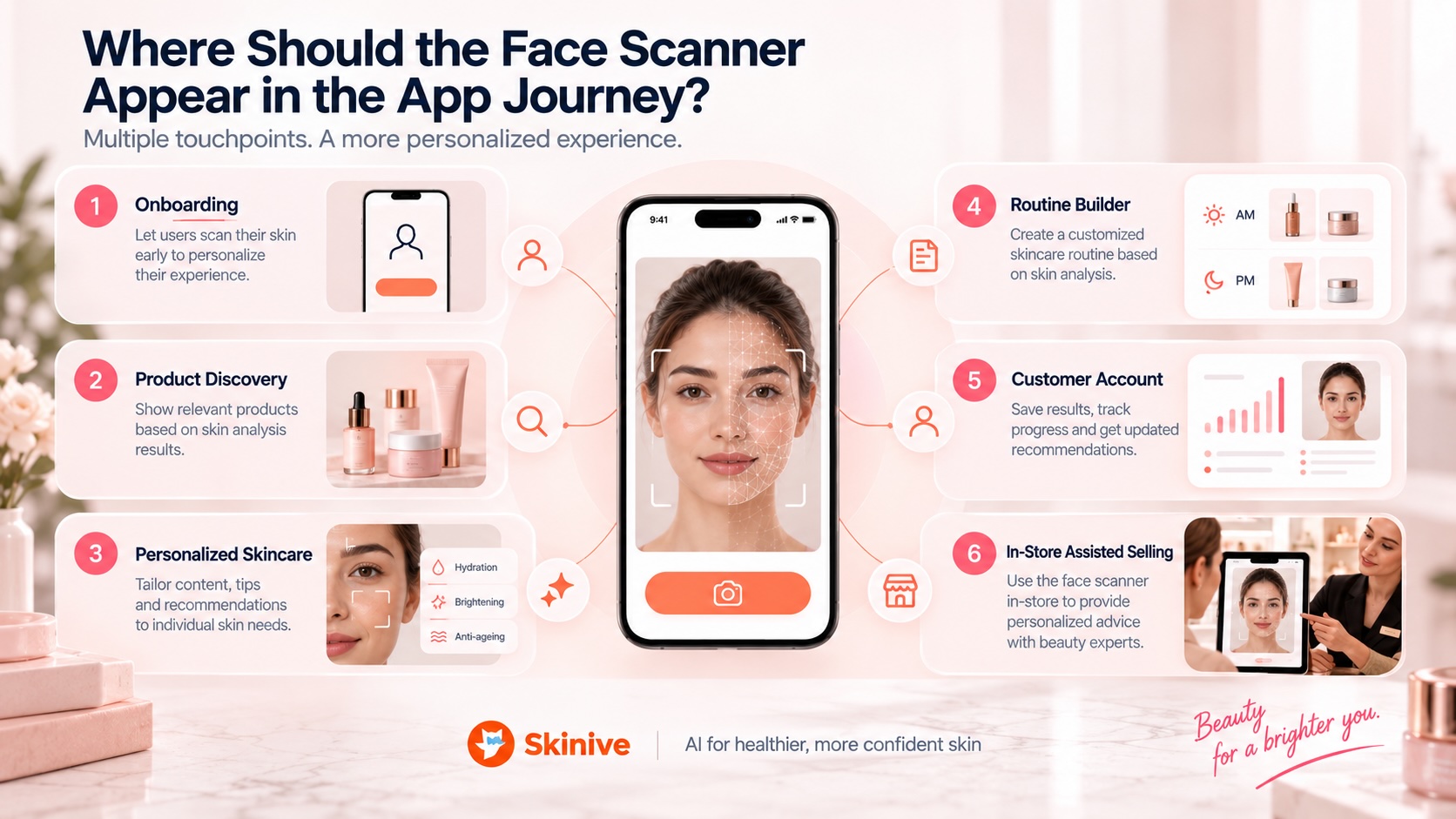
| App touchpoint | Role of face scanning | Example user intent |
|---|---|---|
| Onboarding | Introduce visual personalization | “Help me understand what to focus on.” |
| Personalized skincare | Add current visual information to the experience | “What should I focus on?” |
| Product discovery | Help narrow a large assortment | “Which products are relevant to my concerns?” |
| Product page | Offer another route into personalization | “What else could be relevant to me?” |
| Routine builder | Add visual information to routine personalization | “What could fit into my skincare routine?” |
| Customer account | Connect face scanning with the wider account experience | “Personalize my beauty experience.” |
| In-store assisted selling | Support product exploration on a phone or tablet | “Help me explore relevant products in this store.” |
Placement should follow user intent rather than novelty.
For example, a retailer with thousands of products may introduce face scanning before product discovery. A skincare brand focused on routines may place it before a routine builder.
The Face Scanner should solve a customer problem at the point where it appears.
Face Scanner, Skincare Quiz, or Customer Profile?
Face scanning, skincare quizzes, customer profiles, purchase history, and browsing behavior provide different types of personalization information. A beauty app can combine them rather than choosing only one.
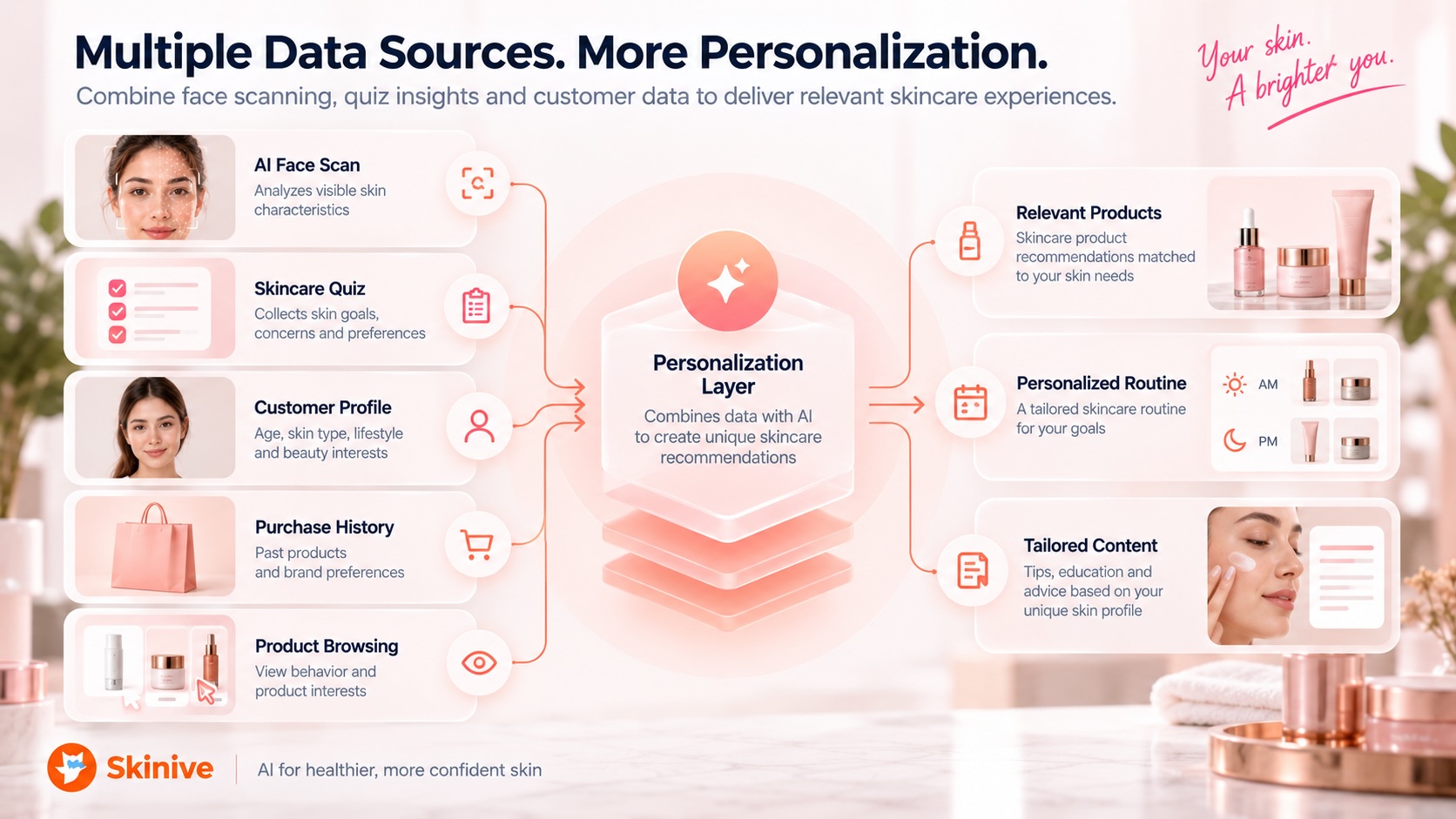
| Personalization input | What it tells the app | Typical strength |
|---|---|---|
| AI face scan | Supported visible facial beauty characteristics | Visual personalization |
| Skincare quiz | Self-reported concerns, goals, habits, and preferences | Context the camera cannot determine |
| Customer profile | Saved preferences and account information | Continuity across the app experience |
| Purchase history | Products previously purchased | Historical shopping behavior |
| Product browsing | Products currently attracting attention | Current commercial intent |
Consider a customer whose face analysis highlights visible pigmentation.
The facial scan provides a visual signal. A questionnaire could separately capture preferred product format, budget, skincare goals, or routine complexity. Purchase history could show what the customer has previously chosen.
These signals answer different questions.
A Face Scanner should therefore be viewed as one component of a broader personalization system rather than an automatic replacement for quizzes, profiles, or behavioral data.
From Face Analysis to Personalized Skincare Recommendations
Face analysis becomes more useful when customers can act on the results. In a beauty app, one of the most relevant next steps is personalized skincare product discovery.
A facial score or list of visible concerns may create initial interest, but it can become a dead end if the app does not explain what the customer can do next.
A stronger journey is:
Face analysis → understand visible concerns → explore relevant skincare → continue shopping or build a routine
For example, supported results relating to fine lines, pores, pigmentation, blackheads, redness, or uneven-looking texture can become inputs for product discovery.
The Face Scanner does not need to be the only recommendation signal. A beauty business can combine visual analysis with customer preferences, questionnaires, product data, and other appropriate information.
This is especially useful in apps with large skincare assortments, where customers might otherwise need to navigate numerous categories, ingredients, filters, and product types.
A dedicated resource on personalized skincare recommendations can explore the recommendation layer in greater detail.
How Can Skinive Connect an Existing Product Catalog to a Beauty App?
Skinive Face Scanner can work with a beauty brand’s or retailer’s existing skincare catalog so that facial-analysis results can support product discovery within the company’s own assortment.
Product data can be supplied in CSV or XML format.
At minimum, catalog entries should include:
- Product name
- Product description
- Ingredients
- Price
- Product-page URL
Catalog synchronization is unlimited.
The Starter plan supports up to 100 products at €99/month plus €0.20 per scan. The Growth plan supports up to 1,000 products at €299/month plus €0.15 per scan. Enterprise requirements are handled through a custom plan with Skinive sales.
For a deeper look at catalog-based personalization in online retail, see AI Face Scanner for E-Commerce: How to Personalize Skincare Shopping.
What Integration Options Are Available for Beauty and Skincare Apps?
Skinive Face Scanner currently provides Web SDK and API integration options. Native iOS and Android SDKs are planned rather than currently available.
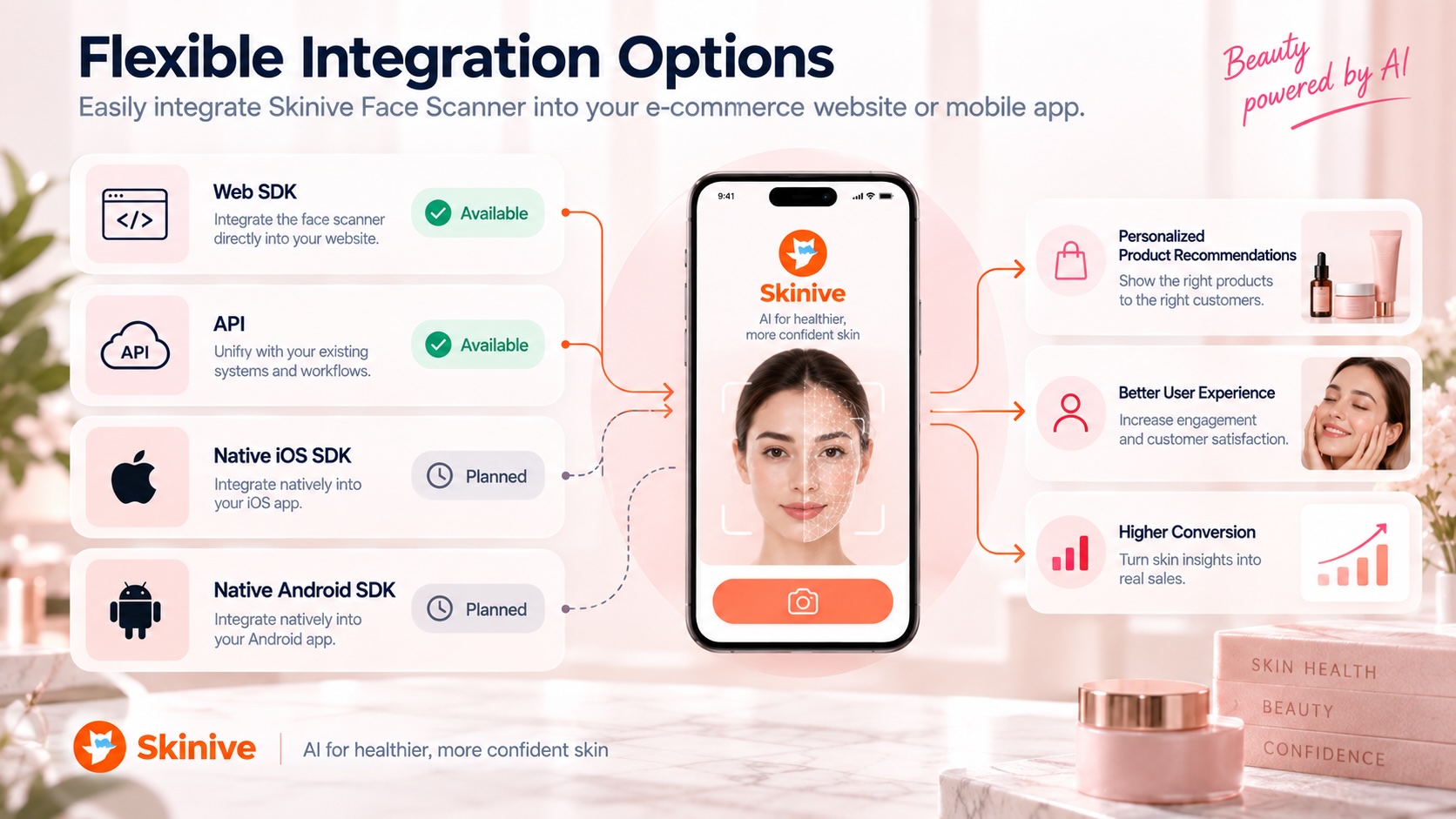
| Integration option | Status | Suitable for | Typical role |
|---|---|---|---|
| Web SDK | Available | Web-based and suitable hybrid experiences | Embed Face Scanner functionality within a controlled web experience |
| API | Available | Custom application workflows | Connect Skinive capabilities with the company’s own application logic and systems |
| Native iOS SDK | Planned | Native iOS applications | Native mobile integration when released |
| Native Android SDK | Planned | Native Android applications | Native mobile integration when released |
Web SDK
The Web SDK is relevant when a business wants to incorporate Skinive Face Scanner into a web-based experience while retaining control over the surrounding interface and customer journey.
For mobile products that use suitable web-based or hybrid components, the Web SDK can provide an integration route without relying on a currently unavailable native mobile SDK.
The exact implementation should be evaluated against the architecture of the app.
API
The API is designed for businesses that need greater control over how Skinive capabilities fit into their own application workflow.
A development team can use the API as part of a custom experience in which the company controls the surrounding interface, customer journey, product logic, and other application components.
This approach is particularly relevant when Face Scanner functionality needs to operate as one part of a larger personalization system rather than as an isolated feature.
Native iOS and Android SDKs
Native iOS and Android SDKs are planned.
Teams building native mobile applications should therefore not design their architecture on the assumption that dedicated native Skinive SDKs are already available.
The current integration path and roadmap should be confirmed with Skinive before implementation begins.
Practical Use Cases for AI Face Scanning in Beauty Apps
The strongest Face Scanner use case depends on what customers already use the app to accomplish. Common applications include product discovery, personalized routines, loyalty experiences, campaigns, and assisted selling.
Personalized Product Discovery
A beauty retailer or skincare brand can use facial analysis to help customers navigate a large product assortment.
Instead of beginning with dozens of categories or filters, customers can start from supported visible concerns and move toward relevant products.
This can be particularly useful for apps containing multiple cleansers, serums, moisturizers, masks, eye-care products, and targeted skincare categories.
Personalized Skincare Routines
Face-analysis results can become one input in a routine-building experience.
An app can combine visible concerns with customer preferences and product information to organize relevant skincare into a clearer journey.
The scanner does not need to determine every aspect of a routine. Its role is to provide visual information that can complement other personalization signals.
Loyalty and Customer Engagement
For apps connected to customer accounts or loyalty programs, Face Scanner functionality can sit alongside product discovery, preferences, loyalty benefits, and other personalized features.
The exact repeat-use experience depends on the application’s architecture, permissions, and data-handling implementation.
Businesses should not assume that facial images or previous analysis results are automatically retained.
Product Launches and Beauty Campaigns
A beauty brand can use face scanning as an interactive entry point for relevant product campaigns.
Instead of presenting exactly the same journey to every customer, supported facial concerns can help guide users toward appropriate product categories or campaign content.
This creates a more personalized discovery path without making unsupported claims about product performance.
Assisted Selling
Face scanning can also support beauty advisors or customers using a phone or tablet in a physical retail environment.
Visible cosmetic concerns can become one input when exploring products available in the store.
For businesses operating both digital and physical channels, this creates a natural bridge between the mobile app and in-store beauty experiences.
How Does a Beauty App Fit Into an Omnichannel Face-Scanning Strategy?
A beauty app can become one channel in a broader Face Scanner strategy that also includes e-commerce and physical retail. The interface can change by channel while the underlying personalization logic remains consistent.
For example, a website may use facial analysis primarily for product discovery. A mobile app may connect it with customer accounts, routines, or loyalty features. An in-store implementation may support product exploration with a beauty advisor.
The goal is not to create an identical interface everywhere.
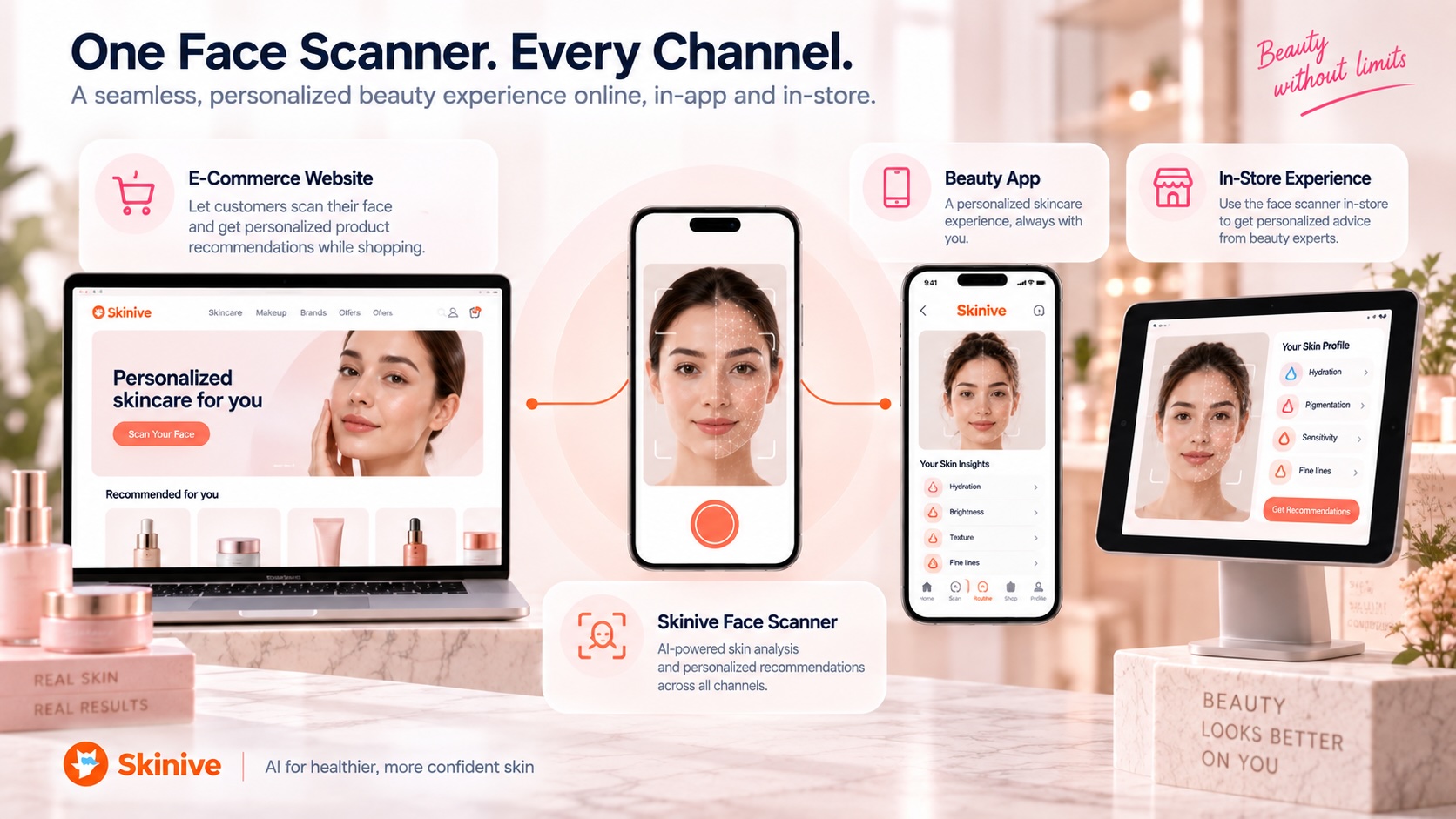
Instead, each channel can follow the same basic logic:
Analyze supported visible concerns → explain the results → connect the customer with a relevant beauty experience
A dedicated omnichannel beauty resource can cover the architecture and cross-channel strategy in more detail.
UX Principles for a Better Mobile Face-Scanning Experience
Mobile UX determines whether customers understand why they should scan, complete image capture successfully, understand the results, and know what to do next.
Explain the Value Before Camera Interaction
Do not make a camera request the first explanation of the feature.
Tell customers what the Face Scanner is designed to do and what type of experience they can expect after completing it.
Keep Image Capture Simple
Customers should receive clear guidance for capturing the required front, left, and right facial images.
Instructions should be concise enough to follow quickly on a mobile device.
Make Results Understandable
Avoid overwhelming customers with technical AI output.
The interface should prioritize understandable visible cosmetic concerns and make it clear how those results relate to the next part of the app experience.
Connect Analysis to Action
The results screen should not become a dead end.
Depending on the use case, customers might continue to products, a routine builder, relevant content, or another personalized beauty feature.
Combine Visual Analysis With Other Personalization Signals
A camera cannot determine every relevant customer preference.
Beauty apps can combine facial analysis with questionnaires, customer profiles, purchase behavior, or other appropriate inputs when building personalization.
Keep Beauty and Medical Positioning Separate
Cosmetic facial analysis should be presented as cosmetic facial analysis.
The app should not imply disease diagnosis, dermatological assessment, or medical decision-making.
What Should Beauty Apps Consider About Privacy and Trust?
Beauty businesses integrating facial analysis should clearly explain why facial images are being used and review the processing, storage, security, consent, and privacy requirements relevant to their implementation.
Facial images can create heightened customer sensitivity even when the purpose is cosmetic rather than medical.
Camera permissions should therefore appear in a logical context. Customers should understand why the app needs facial images and what experience the scan is intended to provide.
Implementation-specific questions about processing, storage, security, and applicable privacy requirements should be addressed during the technical and compliance process rather than assumed from the customer-facing feature alone.
The product boundary should also remain clear: Skinive Face Scanner is designed for beauty, cosmetics, and personalized skincare experiences rather than medical diagnosis.
How Should Beauty Apps Measure Face Scanner Performance?
Face Scanner performance should be measured across the wider customer journey rather than through completed scans alone.
There are two useful measurement layers.
Skinive Face Scanner Dashboard
Skinive’s dashboard includes:
- Scans
- Users
- Product clicks
- Sales conversions
These metrics help businesses understand activity within the Face Scanner and connected product-discovery experience.
App and Commerce Analytics
The business can use its own analytics systems to evaluate the surrounding app journey.
Depending on the implementation, useful metrics may include:
- Face Scanner entry-point click-through rate
- Scan-start rate
- Scan-completion rate
- Product-page visits after scanning
- Add-to-cart behavior
- Repeat interaction with personalized app features
- App engagement or retention
- Differences between users who interact with Face Scanner and relevant comparison groups
Keeping these measurement layers separate avoids attributing metrics to the Skinive dashboard that are actually collected through the company’s own analytics infrastructure.
Together, they can provide a clearer picture of whether customers are simply completing scans or continuing into meaningful product and app interactions.
What Should a Beauty Brand Consider Before Integrating an AI Face Scanner?
Before integration begins, a beauty brand should define the role Face Scanner functionality will play in the customer journey, how it will connect with existing products and personalization tools, and how success will be measured.
A practical implementation checklist includes:
- Which supported visible cosmetic concerns are relevant to the app experience?
- Where will customers discover the Face Scanner?
- What should happen immediately after a scan?
- Should results connect with products, routines, content, or another feature?
- Will the company’s existing skincare catalog be connected?
- Does the current app architecture fit the available Web SDK or API integration options?
- How will camera permissions, privacy information, and consent be handled?
- How should face scanning interact with quizzes, customer profiles, loyalty, or purchase history?
- Which Skinive dashboard metrics and internal app metrics will define success?
- Could the same personalization concept later extend to e-commerce or physical retail?
Answering these questions before development helps teams integrate facial analysis as part of the product experience rather than adding an isolated AI feature.
Getting Started With Skinive Face Scanner for Mobile Beauty
The first step is to define what facial analysis should help customers accomplish inside the app.
For one business, the primary use case may be product discovery. For another, it may be personalized skincare, routine building, loyalty engagement, assisted selling, or a wider omnichannel experience.
Skinive currently provides Web SDK and API integration options, while native iOS and Android SDKs are planned.
Beauty brands and retailers can also connect their existing skincare catalogs through CSV or XML so supported facial beauty concerns can become part of personalized product discovery using the company’s own assortment.
Technical support is available by email and scheduled calls during working hours.
For a broader overview of the technology and available options, explore the Skinive Face Scanner.
The key implementation decision is not simply where to place a Face Scanner button. It is what useful customer journey should begin after the scan.
Related Resources
- AI Face Scanner for E-Commerce: How to Personalize Skincare Shopping
- AI Face Scanner for In-Store Beauty Retail: Personalized Beauty Consultations at the Point of Sale
- AI Face Analysis: How It Works for Beauty & Skincare
- AI Skincare Recommendations: From Face Analysis to Relevant Products
- Personalized Skincare with AI: How Beauty Brands Can Move Beyond Generic Routines
- AI Product Recommendation Engine for Beauty and Skincare Brands
- How AI Face Scanners Can Increase Conversion in Beauty E-Commerce
- Omnichannel Beauty: One AI Face Scanner Across Web, App and In-Store
- Virtual Beauty Consultation: How AI Is Changing the Beauty Advisor Experience
- AI Face Scanner vs. Skin Quiz: Which Creates Better Skincare Personalization?
- What Can an AI Face Scanner Detect? Wrinkles, Pores, Blackheads, Dark Spots and More
- How to Integrate an AI Face Scanner Into a Website in Minutes
- How to Connect a Cosmetics Product Catalog to AI Skincare Recommendations
- The Business Case for AI Beauty Technology: Conversion, Engagement and Customer Retention
Bring AI Face Analysis Into Your Beauty App
Add visual beauty analysis and personalized skincare product discovery to your mobile customer journey. Explore Skinive Face Scanner to review the available integration options and discuss how Face Scanner functionality can fit your beauty, skincare, or retail app.