
Connecting a cosmetics product catalog to AI skincare recommendations turns facial beauty analysis into practical product discovery. Skinive Face Scanner can work with catalogs supplied through CSV or XML, using product names, descriptions, ingredients, prices, and product-page URLs to connect supported visible beauty concerns with products a brand or retailer actually sells.
For beauty businesses, the important part is not simply uploading product data. Recommendation quality also depends on how clearly the catalog describes the assortment, whether prices and links remain current, and whether product information accurately reflects the brand’s cosmetic positioning.
Key Takeaways
- Product catalog integration connects AI face analysis with products from a beauty brand or retailer’s own assortment.
- Skinive Face Scanner supports cosmetics and skincare catalogs supplied through CSV or XML.
- Each product should include, at minimum, a product name, description, ingredients, price, and product-page URL.
- Catalog synchronization is unlimited, allowing businesses to update product information as assortments change.
- Product descriptions and ingredient information give the recommendation experience important context for distinguishing products.
- Starter supports up to 1,000 products, Growth up to 5,000 products, and Enterprise supports custom requirements.
- Catalog quality should be managed continuously: outdated products, incorrect prices, weak descriptions, and broken URLs can reduce the usefulness of personalized product discovery.
Why Does an AI Face Scanner Need a Product Catalog?
AI face analysis and product recommendations solve two different parts of the beauty-shopping journey.
Face analysis provides information about supported visible cosmetic concerns. The product catalog describes what the beauty brand or retailer actually sells.
Connecting them creates a practical customer journey:
Face analysis → visible beauty concerns → relevant products → product pages
Without product catalog integration, a Face Scanner can still provide beauty-focused insights, but the customer must then return to a large assortment and decide independently which products to explore.
For a retailer with hundreds or thousands of skincare products, that can recreate the original problem: too much choice.
Catalog integration gives the personalization experience commercial context. Instead of ending with a facial-analysis result, the journey can continue toward products already available from the business.
For example, a customer whose Face Scanner experience highlights visible pigmentation does not need to begin again by searching every serum and moisturizer in the store. The product catalog can provide the information needed to narrow discovery toward products positioned around more even-looking tone or dark-spot appearance.
The catalog is therefore not an optional database sitting behind the Face Scanner. It is the layer that connects beauty analysis with the retailer’s actual assortment.
For a broader explanation of this customer journey, see AI Skincare Recommendations: From Face Analysis to the Right Products.
How Does the Catalog-to-Recommendation Journey Work?
A catalog-based AI skincare recommendation journey combines two sources of context: information from the Face Scanner and information about the retailer’s products.
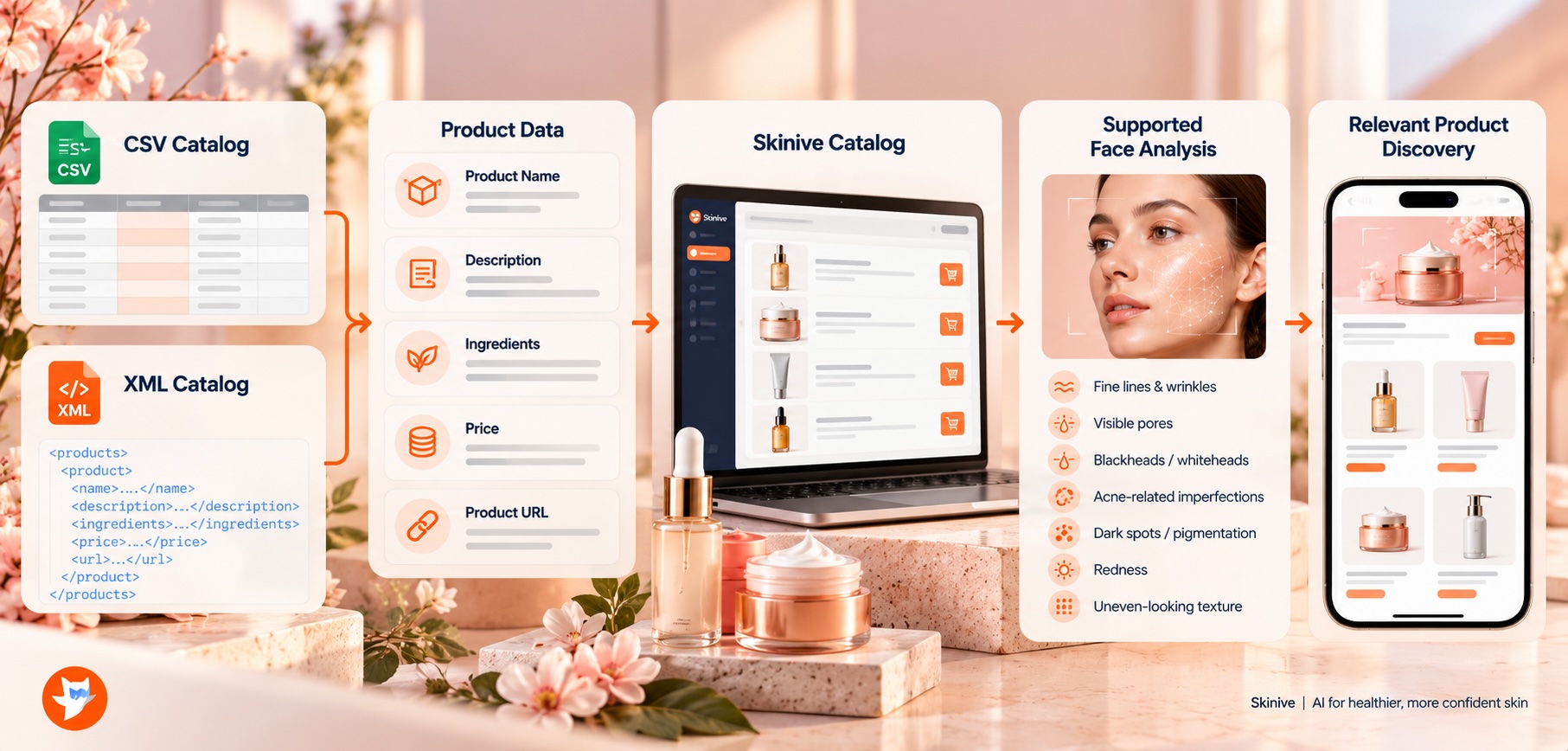
A typical journey can follow these steps:
- The customer captures front, left, and right facial images.
- Skinive Face Scanner analyzes the supported visible cosmetic characteristics.
- The analysis provides beauty-focused context for product discovery.
- The connected catalog provides information about the available skincare products.
- Relevant products or product categories can be surfaced from the retailer’s assortment.
- The customer explores a focused recommendation set rather than the entire catalog.
- Product-page URLs connect recommendations with the retailer’s normal commerce journey.
- Product clicks and sales conversions can be measured through the Skinive dashboard.
The important distinction is that facial analysis and catalog data play different roles.
The Face Scanner helps answer:
What visible beauty concerns are relevant to this customer?
The product catalog helps answer:
Which products in this assortment are relevant to explore next?
Together, they can create a much shorter path from beauty analysis to product discovery.
What Product Data Does Skinive Need?
Skinive Face Scanner can work with a beauty brand or retailer’s existing cosmetics or skincare catalog.
At minimum, each product should include five core fields:
| Product Field | Why It Matters |
|---|---|
| Product name | Clearly identifies the item in the recommendation experience |
| Product description | Explains the product’s cosmetic purpose, format, and positioning |
| Ingredients | Adds formulation context that can help distinguish products |
| Price | Provides current commercial information |
| Product-page URL | Gives the customer a direct destination for product discovery or purchase |
These are the core fields needed to make the product record useful.
A retailer may already store far more information internally, including categories, brands, variants, inventory references, localization data, or merchandising attributes. Those fields may be important to the retailer’s own systems, but catalog complexity should not distract from the quality of the basic product information.
A catalog with dozens of internal fields but vague product descriptions and outdated URLs can still create a weak customer experience.
For recommendation quality, businesses should first make sure that the essential product records are complete, accurate, and understandable.
CSV or XML: Which Catalog Format Should You Use?
Skinive Face Scanner supports product catalogs supplied through CSV or XML.
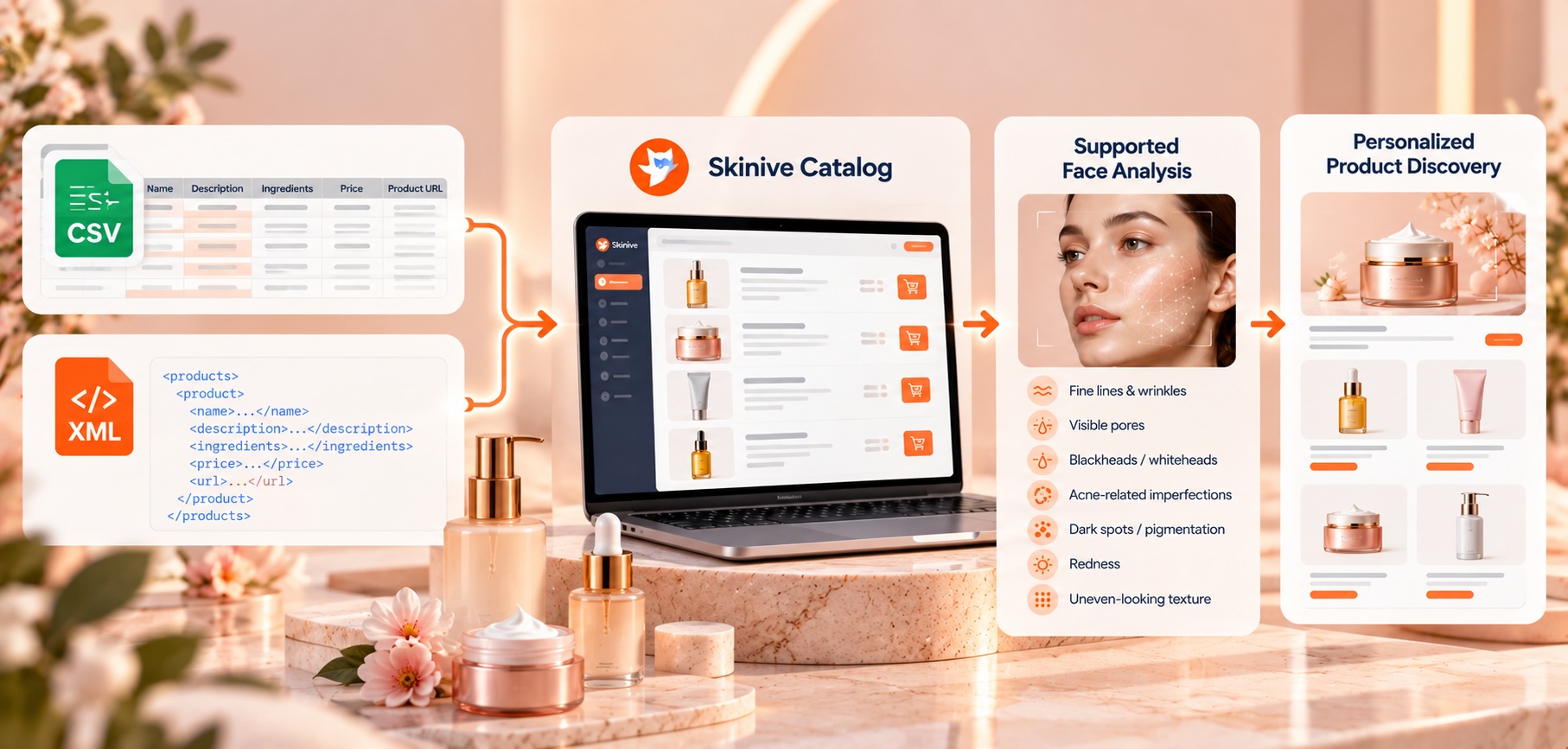
Both formats can provide the information needed for skincare product discovery. The practical choice should depend on how the business already manages product data.
| Format | Good Fit For | Practical Considerations |
|---|---|---|
| CSV | Pilots, straightforward catalogs, spreadsheet-based workflows | Easy for merchandising, e-commerce, and commercial teams to review |
| XML | Existing structured product feeds and larger catalog workflows | Useful when the business already maintains product information as XML |
CSV is often convenient when teams want a product file that can be inspected manually. A commercial or merchandising team can review product names, descriptions, prices, ingredients, and URLs without requiring a complex technical workflow.
XML may be more natural for a business that already maintains structured product feeds.
Neither format is inherently better for AI recommendations.
A complete, current CSV catalog is more useful than an XML feed containing weak or outdated product information. The reverse is equally true.
The better question is:
Which format can the business keep accurate and current with the least unnecessary operational effort?
How Should You Prepare Product Data for AI Skincare Recommendations?
Good catalog integration begins with product-data quality rather than file format.
Several parts of the product record deserve particular attention.
Use Clear Product Names
Product names should clearly identify individual items and correspond to the names customers see in the retailer’s shopping environment.
Duplicate or inconsistent names can make product management harder, particularly in larger assortments.
Variants should also be handled deliberately. If two records represent products customers can separately discover or purchase, separate entries may be appropriate. Accidental duplicates should be removed.
Write Useful Product Descriptions
A product name rarely provides enough information on its own.
Compare:
Hydrating Serum
with:
Lightweight facial serum positioned around hydration and smoother-looking skin.
The second description provides more context about what the product is and how it is positioned.
A good product description can help distinguish:
- the product format;
- the cosmetic purpose;
- relevant appearance-focused benefits;
- where the product may fit within the assortment.
Descriptions should remain accurate to the brand’s real product claims. Catalog preparation is not an opportunity to invent stronger cosmetic or medical claims simply to influence recommendation output.
Keep Ingredient Information Accurate
Ingredient information provides another useful layer of product context.
Two serums may have similar positioning while containing different formulations. Accurate ingredient information helps distinguish them.
Ingredient data should remain current and consistently formatted where practical.
Businesses should avoid adding unsupported ingredient benefits. The connected catalog should reflect information the brand is already comfortable using within its customer-facing commerce experience.
Use the Correct Price
Price is part of the commercial product experience.
If the catalog displays a price that differs from the destination product page, customers may lose confidence in the personalization journey.
This becomes particularly important for international retailers where price and currency can vary by market.
Validate Product-Page URLs
The product-page URL is the bridge between recommendation and commerce.
Each active product should lead to the correct destination.
A recommendation may be relevant, but if the customer reaches a missing page, wrong market, or different product, the personalization journey breaks at one of its most important moments.
Why Product Descriptions and Ingredients Matter
Product catalog integration is not simply about making products technically available to the Face Scanner experience.
The product information needs to contain enough useful context to distinguish items within the assortment.
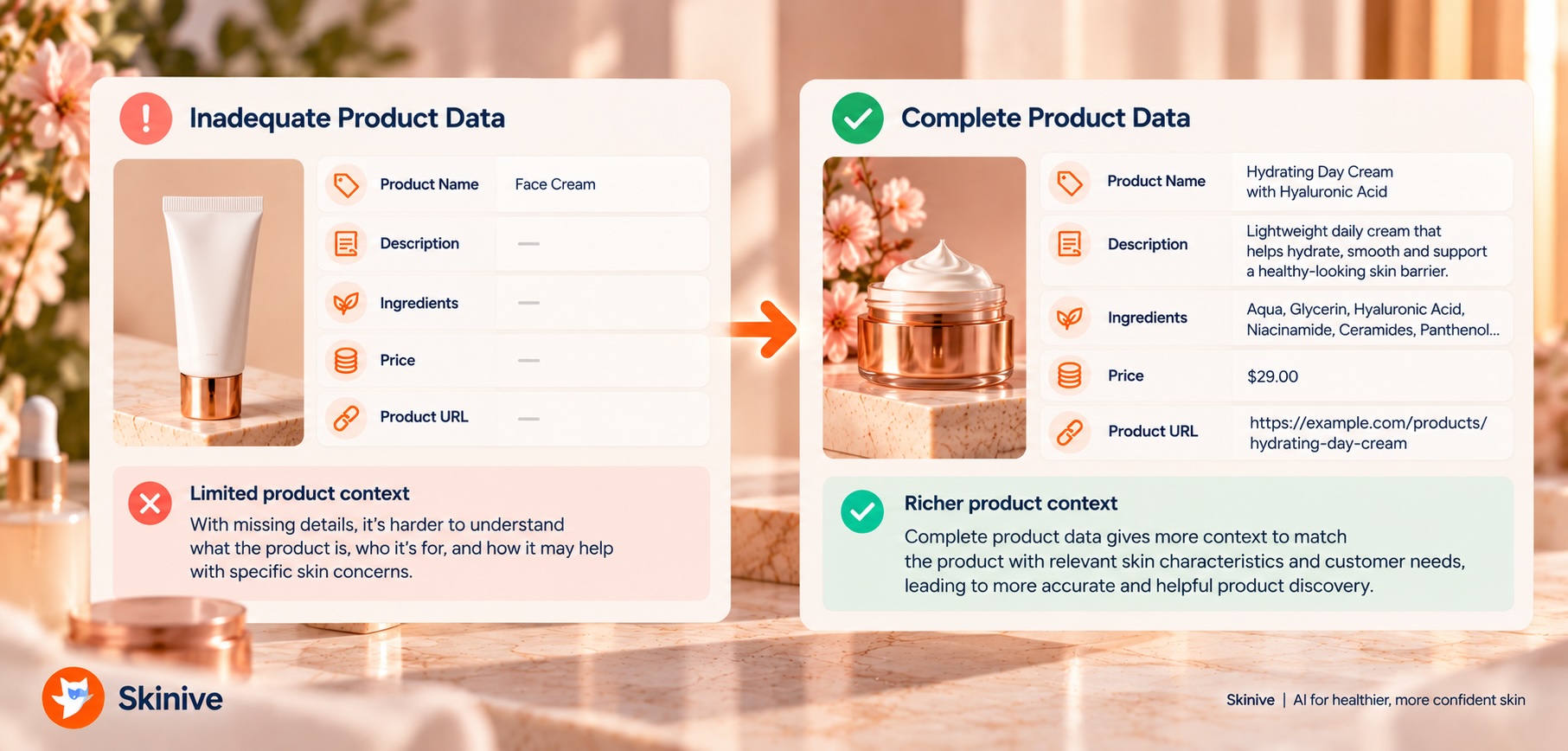
Consider the difference:
| Limited Product Record | More Useful Product Record |
|---|---|
| Hydrating Serum | Lightweight facial serum positioned around hydration and smoother-looking skin |
| Pore Cleanser | Daily cleanser positioned around cleansing and the appearance of pores and impurities |
| Bright Cream | Facial cream positioned around a more even-looking tone and the appearance of dark spots |
| Calming Gel | Lightweight facial gel positioned for comfort and redness-prone appearance |
These examples illustrate product-data quality rather than required Skinive wording.
The stronger records communicate considerably more about the intended cosmetic role of each product.
Ingredient information adds another level of differentiation. Products with similar marketing descriptions may still contain different formulations and occupy different places within the retailer’s assortment.
For a large catalog, these distinctions become increasingly important.
A recommendation experience cannot create high-quality product context from information the business has never supplied.
How Do Visible Beauty Concerns Connect With the Product Catalog?
Skinive Face Scanner analyzes supported visible cosmetic characteristics. Those beauty insights can then become inputs for product discovery.
The connection should remain consistent with the retailer’s real product information and cosmetic positioning.
| Supported Beauty Concern | Example Product-Discovery Context |
|---|---|
| Fine lines & wrinkles | Products positioned around hydration, smoothing, or the appearance of fine lines |
| Visible pores | Products positioned around cleansing, texture, or pore appearance |
| Blackheads / whiteheads | Cosmetic cleansing, clarifying, or exfoliating product discovery |
| Acne-related imperfections | Products positioned around blemish-prone appearance |
| Dark spots / pigmentation | Products positioned around more even-looking tone or dark-spot appearance |
| Redness | Products positioned around comfort, soothing, or redness-prone appearance |
| Uneven-looking texture | Products positioned around smoother-looking or more refined texture |
This mapping should not create claims that do not exist in the product catalog.
If a moisturizer is positioned around hydration, the recommendation experience should not silently reinterpret it as a treatment for a medical condition.
The same principle applies to concerns such as acne-related imperfections, redness, and pigmentation. Skinive Face Scanner belongs to beauty, cosmetics, and personalized skincare. Product discovery should remain within that cosmetic scope.
For more detail on supported visible concerns, see What Can an AI Face Scanner Detect? Wrinkles, Pores, Blackheads, Dark Spots and More.
Should You Connect the Entire Product Catalog at Once?
Not every business needs to begin with its complete assortment.
For an initial implementation, a representative and well-maintained skincare catalog may be more useful than immediately adding every available SKU.
A beauty retailer can begin with:
- active products;
- categories relevant to the Face Scanner journey;
- products with complete descriptions;
- products with accurate ingredient information;
- products available in the target market;
- products with working destination URLs.
This makes recommendation testing easier.
If the product-discovery experience produces confusing results, the business can inspect a smaller set of product records and determine whether the problem comes from product information, catalog structure, or customer-experience design.
Once the underlying process works well, catalog coverage can expand.
A practical rollout can therefore follow:
Representative assortment → validate product data → test recommendations → improve → expand catalog
This approach is particularly useful for large beauty retailers that may eventually need to support thousands of products.
Should Recommendations Show One Product or Several?
Product catalog integration does not mean every Face Scanner result needs to generate one definitive product.
The recommendation format should reflect the customer journey.
| Recommendation Format | When It Can Be Useful |
|---|---|
| Single product | A very focused assortment or campaign |
| Focused shortlist | Several products may be relevant and the customer should compare options |
| Product category | The retailer wants to narrow discovery without selecting individual products |
| Routine | Products have clearly defined complementary roles |
| Advisor shortlist | The Face Scanner supports an advisor-assisted consultation |
For many e-commerce journeys, a focused shortlist is easier to understand than a long list of products.
Showing twenty “personalized” items can recreate the same choice overload that personalization was intended to reduce.
The retailer should therefore design the output around the decision the customer is trying to make, rather than maximizing the number of products displayed.
Why Catalog Synchronization Matters
Cosmetics catalogs change continuously.
Products launch and disappear. Prices change. Descriptions are updated. Product pages move. Seasonal ranges rotate. Different markets may carry different assortments.
If the Face Scanner recommendation experience continues using old product information, customers may encounter products that no longer match the live store.
Skinive supports unlimited catalog synchronization.
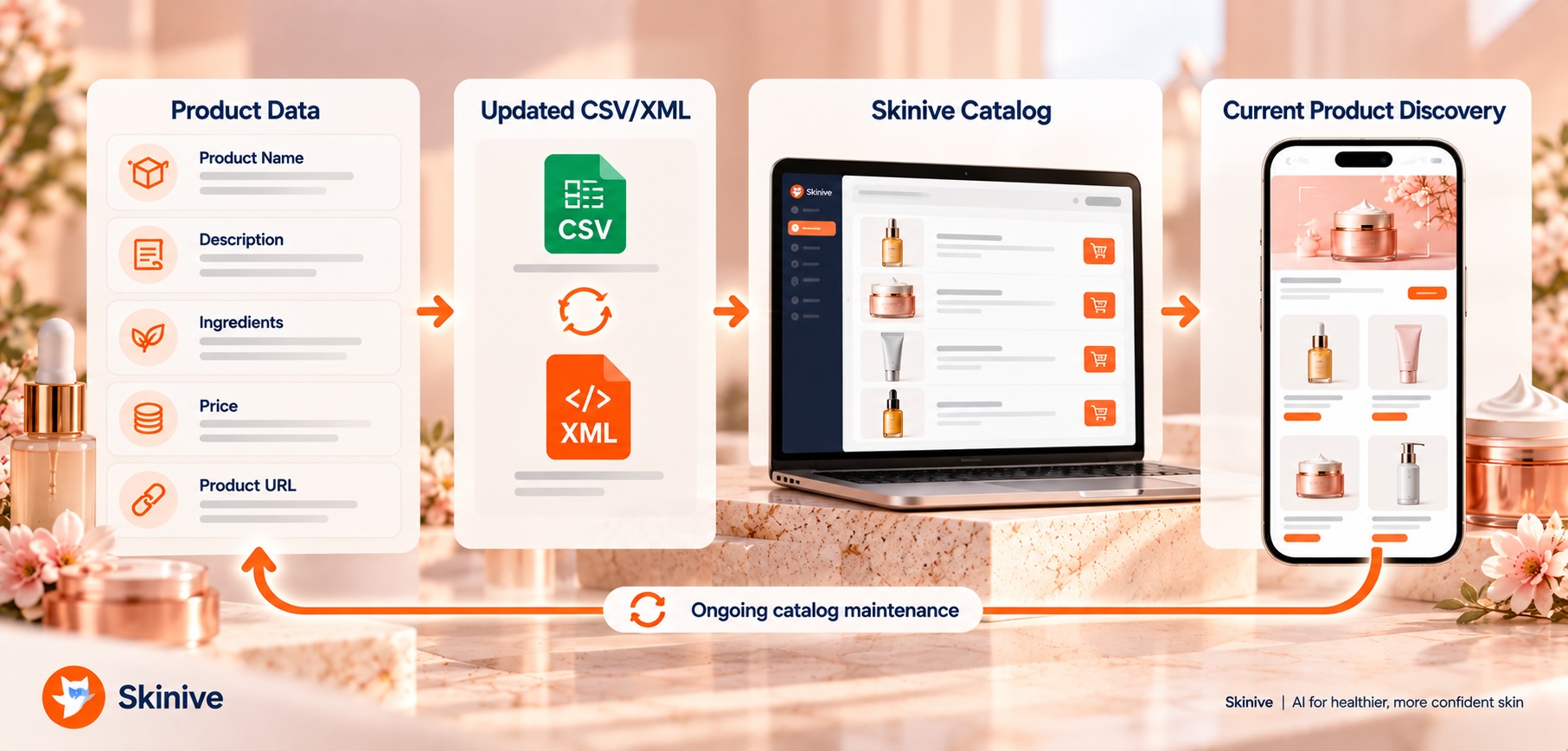
This allows businesses to update catalog information as their assortment changes without a fixed synchronization-count limit.
However, synchronization does not remove the need for product-data ownership.
The retailer should still know:
- which internal system is the source of truth;
- which team owns product descriptions;
- who maintains ingredient information;
- how discontinued products are removed;
- how market-specific pricing is managed;
- how destination URLs are validated.
Depending on the organization, responsibility may sit with e-commerce, merchandising, product-data, or another team.
The important point is that catalog maintenance has an owner.
How Often Should a Cosmetics Catalog Be Updated?
There is no universal update schedule.
The appropriate process depends on the rate at which the assortment changes.
| Catalog Situation | Practical Approach |
|---|---|
| Small, stable assortment | Update when important product information changes |
| Frequent launches or discontinuations | Establish a recurring catalog-maintenance workflow |
| Seasonal assortment | Review product data around each assortment change |
| Large e-commerce catalog | Maintain a structured product-data process |
| Multiple markets | Validate products, prices, and URLs for each relevant market |
The objective is not to synchronize as often as technically possible.
It is to keep the product information used for recommendations aligned with the products customers can actually discover and buy.
A retailer that changes prices weekly has different operational requirements from a beauty brand with a small, stable catalog.
What Happens When Product Data Is Out of Date?
Outdated product data can create problems even if the Face Scanner analysis is functioning correctly.
For example:
- a recommended product may have been discontinued;
- a price may no longer match the store;
- a link may lead to a missing or incorrect product page;
- a recently launched product may never appear;
- an old description may no longer reflect the current formulation or positioning;
- customers may be directed toward products intended for a different market.
These are not merely backend catalog issues.
They directly affect how customers experience personalization.
If an AI-powered recommendation leads to a product that is unavailable or incorrectly described, customers may question the quality of the entire experience.
Catalog maintenance is therefore part of customer-experience quality.
How Should Multi-Market Beauty Retailers Structure Catalog Data?
International retailers need to account for differences between markets.
The same product may have different:
- availability;
- prices;
- currencies;
- product-page URLs;
- language;
- merchandising;
- assortment context.
Not every difference needs to be managed inside Skinive itself. The surrounding implementation should determine which catalog information is appropriate for each market or customer environment.
A customer shopping in one country should not be directed toward a product page for another market simply because the underlying product name is similar.
For businesses planning international rollout, it can be practical to validate one market first.
This provides an opportunity to identify catalog-quality issues, product mapping problems, or destination errors before expanding the same process across several markets.
How Can One Catalog Support Web, App and Physical Retail?
The same underlying product-data structure can support several beauty channels, but the customer experience and available assortment may differ.
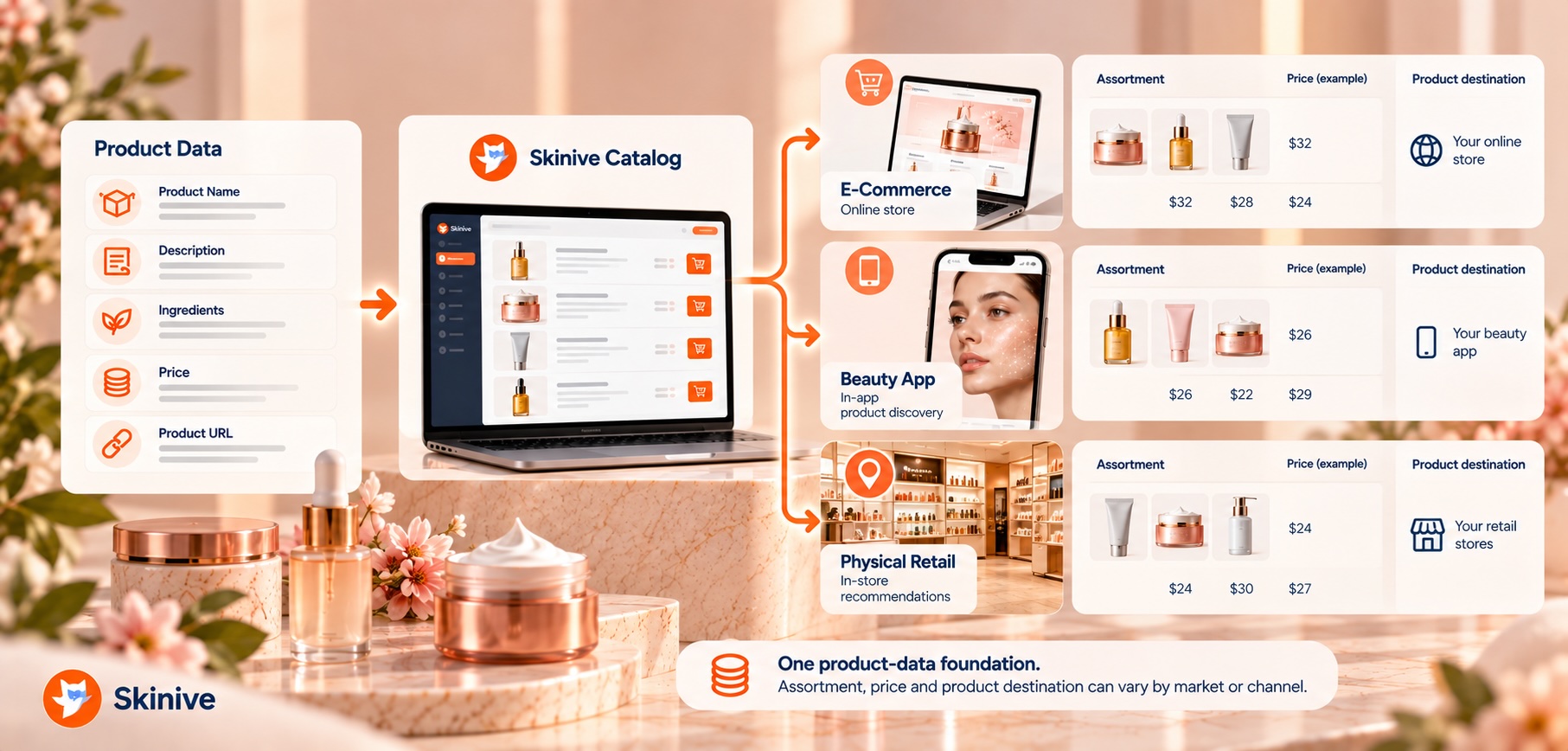
E-Commerce
On a beauty website, the catalog provides the direct connection from face analysis to online product pages.
A typical journey is:
Face Scanner → Beauty Insights → Relevant Products → Product Page
Skinive provides a ready-to-use Web Widget, Web SDK, and API for web implementations. The basic Web Widget can be launched in around five minutes.
For the technical website workflow, see How to Integrate an AI Face Scanner Into a Website in Minutes.
Beauty Apps
The same catalog concept can support product discovery within a beauty or skincare app.
Skinive currently provides Web SDK and API integration options. Native iOS and Android SDKs are planned.
Any additional customer-profile, loyalty, or app-specific functionality depends on the business’s own application environment and should not be assumed to be automatically provided by Skinive.
Physical Retail
Product information can also support Face Scanner experiences in physical beauty retail.
The assortment used for discovery should reflect products that are relevant to the particular market or retail environment.
If the business needs real-time store inventory, shelf location, or POS information, those capabilities need to be handled through the retailer’s own systems or additional integrations.
Skinive Face Scanner should not be assumed to provide those functions automatically.
Omnichannel Beauty
A shared catalog structure can help keep product understanding consistent across channels.
That does not mean every channel needs to display exactly the same assortment.
Market availability, pricing, inventory, language, and merchandising can still require different product sets or destinations.
The goal is consistency in product understanding while respecting commercial reality.
How Many Products Can Skinive Support?
The maximum catalog size depends on the Skinive Face Scanner plan.
| Plan | Monthly Fee | Price per Scan | Product Catalog |
|---|---|---|---|
| Starter | €99/month | €0.20 | Up to 1,000 products |
| Growth | €199/month | €0.15 | Up to 5,000 products |
| Enterprise | Custom | Custom | Custom |
A retailer should consider both current catalog size and expected assortment growth.
Scan volume also matters because Starter and Growth use different usage pricing.
A focused skincare brand may comfortably fit within the Starter catalog limit, while a larger multi-brand retailer may require Growth or an Enterprise plan.
Catalog size should not be treated as the only factor. The appropriate plan also depends on scan volume and implementation requirements.
How Should You Test Product Recommendations After Catalog Integration?
Catalog integration should be tested as a customer-facing product experience, not only as a successful data import.
A practical testing process can include:
- Confirm that all five core product fields are populated.
- Check for duplicate or discontinued products.
- Review descriptions and ingredient information for accuracy.
- Verify product prices.
- Open representative product-page URLs.
- Run Face Scanner journeys covering different supported beauty concerns.
- Review whether the resulting product options make sense based on the retailer’s real product positioning.
- Check whether some products appear disproportionately often or never appear when expected.
- Test market-specific destinations where relevant.
- Repeat catalog QA after major assortment changes.
Recommendation review should not belong only to developers.
Merchandising, e-commerce, product, or brand teams often have the context needed to recognize when technically correct product data produces commercially confusing recommendations.
Testing should therefore answer two different questions:
Is the catalog technically correct?
and:
Does the product discovery make sense to a customer?
How Should Catalog Recommendation Performance Be Measured?
Catalog integration should be evaluated through product behavior as well as scanner usage.
Skinive’s dashboard includes:
- scans;
- users;
- product clicks;
- sales conversions.
Retailers can combine these with metrics from their own commerce environment.
| Measurement Area | What to Evaluate |
|---|---|
| Catalog health | Missing information, invalid URLs, outdated products |
| Face Scanner usage | Scans and users |
| Product engagement | Product clicks |
| Commerce | Sales conversions |
| Assortment coverage | Which products and categories appear in personalized journeys |
| Operational quality | Market mismatches, duplicate records, outdated destinations |
Metrics such as product-page visits, add-to-cart behavior, CRM data, loyalty activity, or store-level outcomes depend on the retailer’s own analytics systems.
The goal is not simply to maximize the number of recommendations shown.
The more useful question is:
Does the connected catalog help customers move from facial beauty analysis toward relevant products with less unnecessary searching?
Common Product Catalog Integration Mistakes
Catalog integration can be technically successful while still producing a weak personalization experience.
Uploading Product Names Without Useful Descriptions
A product name alone may provide very little context about cosmetic positioning.
Leaving Ingredient Information Incomplete
Missing or inconsistent ingredient information reduces the quality of the underlying product record.
Using Outdated Prices
The recommendation experience should not conflict with the retailer’s live commercial information.
Keeping Broken or Incorrect Product URLs
A relevant recommendation loses much of its value if the customer cannot reach the correct destination.
Leaving Discontinued Products Active
The connected catalog should reflect the assortment customers can realistically explore.
Importing Too Much Too Early
A smaller clean catalog can be easier to test than thousands of products with inconsistent data.
Treating Synchronization as Catalog Governance
Unlimited synchronization makes updates possible. It does not decide which data is correct or who owns it internally.
Ignoring Market Differences
Products, prices, and destinations may differ significantly between countries or channels.
Adding Unsupported Product Claims
Descriptions should remain consistent with the brand’s actual cosmetic positioning and permitted claims.
Showing Too Many Recommended Products
Personalization should reduce product-discovery friction rather than create another large product grid.
A Practical Catalog Integration Checklist
Before launching catalog-based AI skincare recommendations, check the following:
- Choose CSV or XML based on the existing product-data workflow.
- Include product name, description, ingredients, price, and product-page URL.
- Remove irrelevant or discontinued products.
- Check for unintended duplicate records.
- Review descriptions for useful cosmetic context.
- Validate ingredient information.
- Confirm market-appropriate pricing.
- Verify product-page URLs.
- Start with a manageable active assortment if the catalog is large.
- Run representative Face Scanner journeys.
- Review recommendations with merchandising or product teams.
- Establish responsibility for future catalog updates.
- Monitor product clicks and sales conversions after launch.
The objective is not to create the largest possible product feed.
It is to provide a reliable product-data foundation that helps customers discover relevant skincare products.
Privacy, Product Claims and the Beauty Boundary
Product catalog integration does not change the intended scope of Skinive Face Scanner.
Skinive Face Scanner is designed for beauty, cosmetics, and personalized skincare. It should not be presented as diagnosing skin diseases or prescribing medical treatment.
This boundary also applies to product recommendations.
A visible cosmetic concern should not be used to transform a skincare product into an implied medical treatment.
Product descriptions and recommendation language should remain consistent with the brand’s actual cosmetic claims.
Businesses should also review the privacy requirements applicable to their specific implementation, including requirements related to facial images and any additional customer information used in the personalization experience.
How Skinive Supports Product Catalog Integration
Skinive Face Scanner provides the core capabilities needed to connect supported facial beauty analysis with a retailer’s product assortment.
| Capability | Skinive Face Scanner |
|---|---|
| Catalog formats | CSV and XML |
| Minimum product fields | Name, description, ingredients, price, product-page URL |
| Catalog synchronization | Unlimited |
| Starter catalog | Up to 1,000 products |
| Growth catalog | Up to 5,000 products |
| Enterprise catalog | Custom |
| Web Widget | Available |
| Web SDK | Available |
| API | Available |
| Native iOS SDK | Planned |
| Native Android SDK | Planned |
| Dashboard analytics | Scans, users, product clicks, sales conversions |
| Technical support | Email and scheduled calls during working hours |
This gives beauty businesses several ways to begin.
A smaller retailer can start with a straightforward catalog and ready-to-use web implementation. A larger organization can use the same core product concept within a more customized customer experience.
A Recommended Rollout: Start With Catalog Quality
A practical implementation does not need to begin with the entire assortment.
Start with a representative set of active skincare products and establish a reliable product-data process first.
- Select products and categories relevant to the first Face Scanner journey.
- Clean the five minimum product fields.
- Standardize descriptions and ingredient information where practical.
- Validate prices and product URLs.
- Connect the catalog through CSV or XML.
- Run representative Face Scanner journeys.
- Review the resulting product discovery with product or merchandising teams.
- Launch the initial experience in a defined channel or market.
- Measure product clicks and sales conversions.
- Maintain the catalog as the assortment changes.
- Expand catalog coverage when the workflow is stable.
The operating model is straightforward:
Clean Product Data → Connect Catalog → Test → Launch → Measure → Maintain → Expand
This treats catalog integration as part of the personalization product rather than a one-time file-import task.
Related Resources
- AI Face Scanner for E-Commerce: How to Personalize Skincare Shopping
- AI Face Scanner for Beauty & Skincare Apps: Integration and Use Cases
- AI Face Scanner for In-Store Beauty Retail: Personalized Beauty Consultations at the Point of Sale
- AI Face Analysis: How It Works for Beauty & Skincare
- AI Skincare Recommendations: From Face Analysis to Relevant Products
- Personalized Skincare with AI: How Beauty Brands Can Move Beyond Generic Routines
- AI Product Recommendation Engine for Beauty and Skincare Brands
- How AI Face Scanners Can Increase Conversion in Beauty E-Commerce
- Omnichannel Beauty: One AI Face Scanner Across Web, App and In-Store
- Virtual Beauty Consultation: How AI Is Changing the Beauty Advisor Experience
- AI Face Scanner vs. Skin Quiz: Which Creates Better Skincare Personalization?
- What Can an AI Face Scanner Detect? Wrinkles, Pores, Blackheads, Dark Spots and More
- How to Integrate an AI Face Scanner Into a Website in Minutes
- The Business Case for AI Beauty Technology: Conversion, Engagement and Customer Retention
Connect Your Skincare Catalog to AI-Powered Product Discovery
Turn supported facial beauty insights into relevant product discovery using the products your business already sells.
Connect your cosmetics or skincare catalog through CSV or XML and use Skinive Face Scanner to create a direct path from face analysis to relevant products.