
Personalized Tan Tracker & Sun Exposure Timer



Free Tanning App: Personalized Tan Tracker & Sun Exposure Timer
Skinive is a free tanning app and sun exposure tracker that helps you understand and monitor time spent in the sun using the live UV Index, your Fitzpatrick skin type and SPF.
Instead of using the same tanning timer for everyone, Skinive provides a personalized UV exposure estimate based on current environmental conditions and your selected skin characteristics.
Use Skinive to check the UV Index, start a sun exposure timer, consider SPF, track estimated Vitamin D progress and keep an eye on your skin and moles — all in one skin-health app.
Track your sun exposure with Skinive — free on iPhone and Android.

Tanning App: Quick Summary
|
Feature |
What Skinive Does |
|---|---|
|
✅ Sun Exposure Timer |
Track how long you spend in the sun |
|
✅ Personalized Exposure Estimate |
Uses current UV conditions and selected personal factors |
|
✅ Live UV Index |
Check UV intensity for your selected location |
|
✅ UV Forecast |
See how UV levels change throughout the day |
|
✅ Skin Type Personalization |
Select Fitzpatrick skin type I–VI |
|
✅ SPF Support |
Include sunscreen/SPF selection in your exposure estimate |
|
✅ Vitamin D Estimate |
Follow an estimated Vitamin D progress indicator during sun exposure |
|
✅ Tan / Exposure Tracker |
Keep track of outdoor exposure rather than relying on guesswork |
|
✅ UV Widget |
Access UV and exposure information from your Home Screen where supported |
|
✅ Skin Health Insights |
Understand how UV exposure may relate to your skin |
|
✅ AI Skin Scanner |
Analyze moles, spots and other visible skin concerns |
|
✅ Free to Use |
Access Skinive’s core UV and sun-exposure tools for free |
What Is a Tanning App?
A tanning app is a mobile tool designed to help people keep track of sun exposure and the conditions that affect it.
Basic tanning timers may simply count minutes.
A more useful tan tracker should consider that 30 minutes outside does not represent the same UV exposure every day. UV intensity changes according to location, time of day, season, weather and other environmental factors.
Individual skin characteristics matter too.
Skinive therefore combines a sun exposure timer with the live UV Index, selected skin phototype and SPF information.
Rather than asking only:
“How long have I been outside?”
Skinive helps put that time into context:
“What are the UV conditions, and how do they relate to my selected skin type and sun protection?”
This makes Skinive more than a simple countdown timer.
How Does the Skinive Tanning Timer Work?
Skinive’s UV Exposure Timer provides an approximate exposure-time estimate using environmental UV conditions and information selected by the user.
According to the current Skinive User Manual, the calculation considers:
- current UV Index;
- selected location;
- Fitzpatrick skin phototype;
- sunscreen/SPF selection, where applicable.
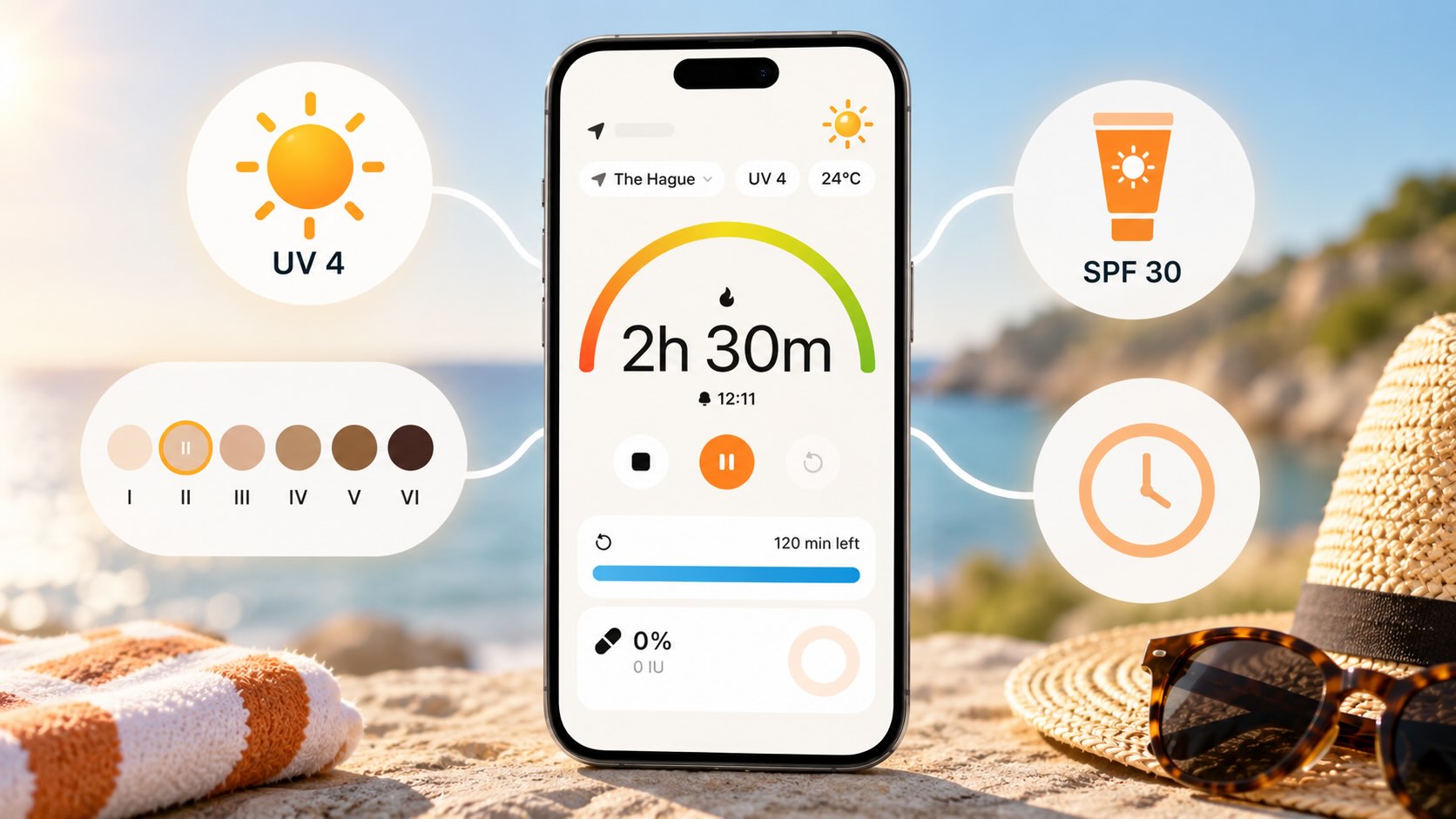
How to use the tanning and sun exposure timer
- Select your location.
- Check the current UV Index.
- Choose your Fitzpatrick skin type.
- Add SPF information where applicable.
- Start the exposure timer.
- Monitor your time and changing UV conditions.
- Stop or reset the timer when your outdoor session ends.
The result is an approximate, personalized estimate rather than a generic fixed tanning schedule.
Important: Skinive’s exposure estimates are informational. Actual response to UV radiation varies between individuals and can be influenced by factors the application does not account for.
Personalized Tanning Timer for Your Skin Type
Not everyone responds to sunlight in the same way.
Skinive lets you select your Fitzpatrick skin phototype from I to VI, and your selected phototype is used as one of the inputs for the UV exposure estimate.
The Fitzpatrick system broadly describes how different skin types respond to sun exposure.
Lighter phototypes generally burn more readily, while greater amounts of melanin provide some natural protection against UV. However, people of every skin tone can experience UV-related skin damage. WHO notes that all skin types can be affected by UV radiation.
This is why a personalized timer is more meaningful than simply recommending the same number of minutes to every user.
Skinive connects:
Your Skin Type → Current UV → SPF → Exposure Estimate
rather than treating every person and every sunny day identically.
Tan Tracker Based on the Live UV Index
A tanning timer without UV information misses one of the most important variables: UV intensity.
The UV Index indicates the level of ultraviolet radiation reaching the Earth’s surface. The higher the number, the greater the potential for skin and eye damage and the less time it may take for harm to occur.
Skinive displays the current UV Index and daily forecast for your selected location.
This means your sun exposure can be viewed in the context of actual UV conditions.
For example, the same 30 minutes outdoors may involve very different UV exposure:
- early in the morning versus around midday;
- on a low-UV versus high-UV day;
- in different seasons;
- at different locations.
For a detailed breakdown of current UV conditions and forecasts, use the Skinive Free UV Index App
UV Index Levels and Sun Exposure
Skinive follows the internationally recognized UV Index scale.
|
UV Index |
Level |
General Guidance |
|---|---|---|
|
0–2 |
Low |
Lower potential for UV-related harm, although exposure duration and individual sensitivity still matter |
|
3–5 |
Moderate |
Sun protection is recommended |
|
6–7 |
High |
Additional protection and reduced midday exposure become increasingly important |
|
8–10 |
Very High |
Strong protection and shade are important |
|
11+ |
Extreme |
Unprotected skin and eyes can be harmed quickly |
WHO recommends using sun-protection measures when the UV Index reaches 3 or above.
This is why Skinive treats the UV Index as a core part of sun-exposure tracking rather than simply running a timer independently of environmental conditions.
Tanning With SPF: How Skinive Adjusts the Timer
Skinive can incorporate sunscreen/SPF selection into its UV exposure estimate where applicable.
That allows the app to consider:
UV conditions + skin phototype + SPF
when providing an approximate exposure-time estimate.
However, SPF does not make prolonged sun exposure risk-free.
Sunscreen reduces UV exposure when used correctly, but it does not block all ultraviolet radiation. WHO specifically advises that sunscreen should not be used simply to extend the amount of time spent in the sun.
Sunscreen should instead form part of a broader protection strategy that can include:
- seeking shade;
- protective clothing;
- a broad-brimmed hat;
- sunglasses;
- limiting unnecessary exposure during periods of intense UV.
Want to understand sunscreen and SPF in more detail?
Read: Sunscreen Essentials — How to Choose & Apply It Correctly →
Track Estimated Vitamin D From Sun Exposure
Sunlight plays a role in Vitamin D production.
When UVB radiation reaches uncovered skin, it initiates a process that enables the body to synthesize Vitamin D. However, the amount produced varies substantially according to factors including season, time of day, cloud cover, skin pigmentation and sunscreen use.
Skinive includes an estimated Vitamin D progress indicator as part of its sun-exposure experience.
While tracking your outdoor session, you can view your estimated Vitamin D progress alongside information such as UV conditions and exposure time.
This makes Vitamin D a useful supporting metric within the tanning and sun exposure tracker rather than requiring a separate app.
Can a tanning app measure your Vitamin D level?
No.
Skinive does not measure Vitamin D in your blood and the estimate should not be interpreted as a Vitamin D deficiency test.
The NIH notes that it is difficult to provide a universal recommendation for the amount of sun exposure required for sufficient Vitamin D synthesis because so many environmental and individual factors affect the process.
If you need to know your actual Vitamin D status, appropriate medical testing is required.
Free Tan Tracker for Outdoor Sun Exposure
If you regularly spend time outside, keeping track of exposure can be more useful than relying on intuition alone.
Skinive combines several tools in one workflow:
Live UV Index → Skin Type → SPF → Exposure Timer → Vitamin D Estimate
This can be useful during:
- beach days;
- holidays;
- outdoor exercise;
- gardening;
- walking and hiking;
- other extended outdoor activities.
Rather than encouraging users to maximize tanning time, the goal is to make UV exposure more visible and understandable.
That distinction matters because a tan itself is not evidence that UV exposure has been harmless.
Is There Such a Thing as Safe Tanning?
No UV-based tan can be considered completely safe.
The FDA states that tanning is a sign of skin damage: UV exposure stimulates additional melanin production as the skin attempts to protect itself from further damage.
WHO similarly states that there is no healthy tan and explains that the protection provided by a UV-induced tan is limited and does not protect against long-term damage such as skin cancer.
This is why Skinive should be thought of as a sun exposure awareness and tracking tool, not a guarantee of “safe tanning.”
A timer cannot eliminate UV risk.
What it can do is make factors such as UV intensity, exposure duration, skin phototype and SPF easier to keep in mind when you’re outdoors.
Sun Tanning vs Indoor Tanning
Skinive’s outdoor UV tools should not be interpreted as guidance for tanning beds or sunbeds.
Artificial tanning devices expose the skin to ultraviolet radiation. WHO advises avoiding artificial tanning devices and notes that sunbed use increases skin-cancer risk.
Skinive’s location-based UV information and exposure tools are designed around environmental UV conditions, not as a protocol for operating a sunbed.
If your goal is cosmetic skin darkening without UV exposure, sunless tanning products are a different category. They do not necessarily provide sun protection, so sunscreen may still be necessary when going outdoors.
Your Skin Conditions Matter Too
Skinive is not built only around weather.
The wider Skinive ecosystem can provide skin-focused educational context, helping users understand that UV, heat, sweating and outdoor exposure may have different relevance depending on their skin.
Some dermatological conditions can be affected differently by sunlight or heat.
At the same time, medical UV phototherapy should not be confused with ordinary sun exposure or tanning. Clinical phototherapy uses controlled wavelengths, doses and treatment protocols under medical supervision.
If you have a diagnosed skin condition, take photosensitizing medication or are undergoing dermatological treatment, follow the advice of your healthcare professional rather than using a tanning timer to determine an appropriate UV dose.
Tanning App vs a Basic Timer or Weather App
A stopwatch can count minutes.
A weather app can show the UV Index.
Skinive connects these pieces with information about your skin.
|
Feature |
Basic Timer |
Typical Weather App |
Skinive |
|---|---|---|---|
|
Time tracking |
✅ |
Usually no |
✅ |
|
Current UV Index |
No |
✅ |
✅ |
|
UV Forecast |
No |
✅ |
✅ |
|
Fitzpatrick skin type |
No |
Usually no |
✅ |
|
Personalized exposure estimate |
No |
Usually no |
✅ |
|
SPF input |
No |
Usually no |
✅ |
|
Vitamin D estimate |
No |
No |
✅ |
|
Skin-health context |
No |
No |
✅ |
|
AI skin scanner |
No |
No |
✅ |
|
Mole monitoring |
No |
No |
✅ |
he key difference is not simply having more features.
It’s the connection between them:
Sun conditions + your skin + exposure time + ongoing skin monitoring.
More Than a Tanning App: Monitor Your Skin Too
Sun exposure and skin monitoring belong in the same conversation.
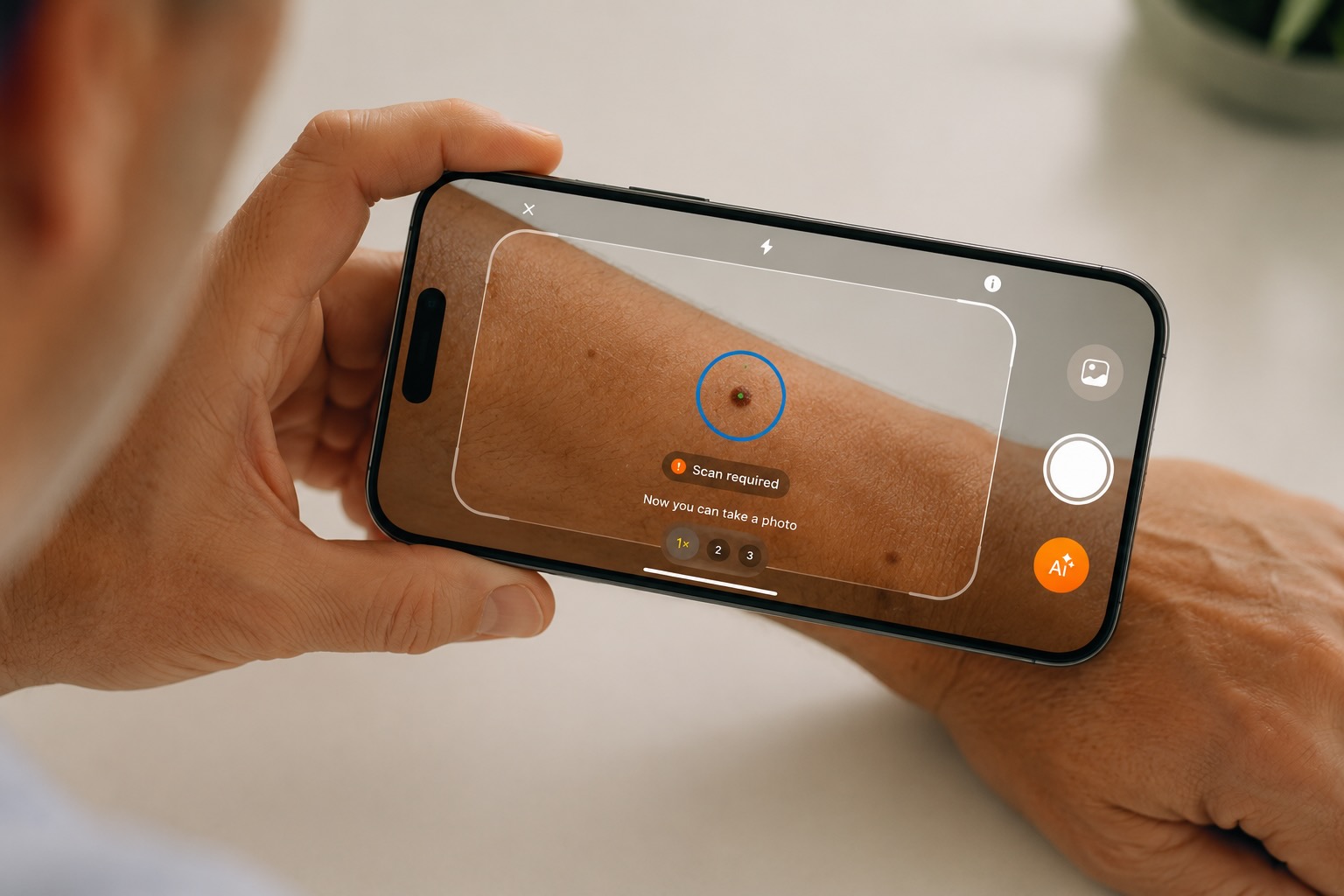
Skinive combines its UV and exposure tools with AI-powered skin analysis and longitudinal monitoring.
Users can photograph visible skin concerns, receive an AI-based assessment and save results in their history for future reference and monitoring.
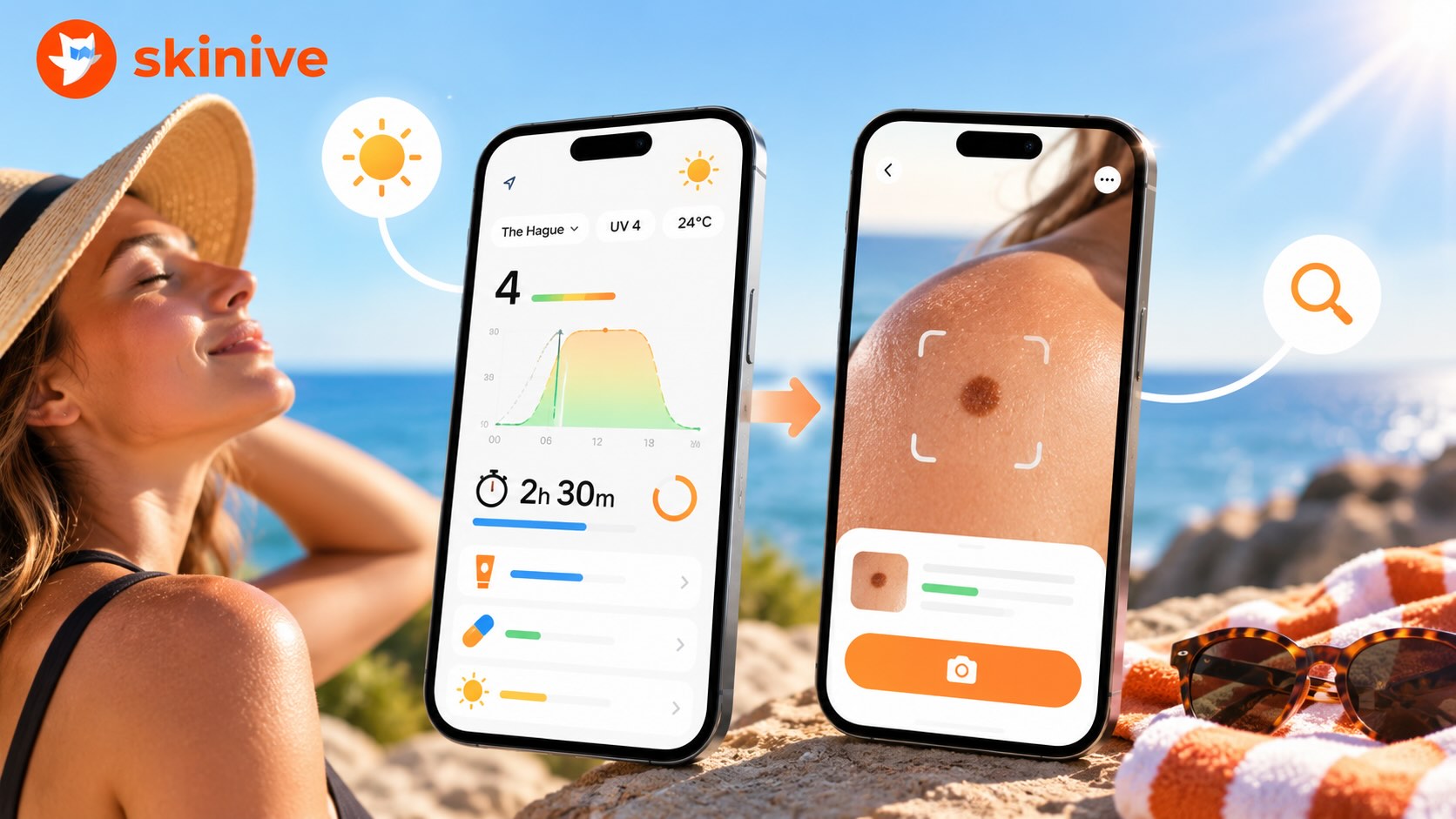
This creates a broader routine:
- Check today’s UV Index.
- Understand your approximate personalized exposure time.
- Use appropriate sun protection.
- Keep an eye on visible changes in your skin and moles over time.
You can use Mole Checker Skinive for visible skin concerns and Skinive’s mole-monitoring functionality to keep track of spots and moles.
Monitor Your Moles with Skinive →
Skinive’s AI analysis does not provide a definitive diagnosis and cannot confirm or rule out melanoma or other forms of skin cancer. New, changing, bleeding, painful or otherwise concerning lesions should be evaluated by a healthcare professional.
Why UV Exposure Matters for Long-Term Skin Health
The effects of UV exposure are not limited to immediate sunburn.
Cumulative UV exposure contributes to premature skin ageing and skin cancer, while repeated exposure can cause damage even when obvious sunburn does not occur.
Long-term sun exposure is also closely associated with actinic keratosis, a precancerous skin condition that commonly develops on chronically sun-exposed areas.
Learn about Actinic Keratosis →
UV radiation is also an established cause of major forms of skin cancer.
Learn about Skin Cancer, its types and signs →
A tanning tracker cannot prevent these conditions, but greater awareness of UV intensity and exposure duration can support more informed decisions about sun protection.
Free Tanning App for iPhone and Android
Looking for a free tanning app or free tan tracker?
Skinive combines its UV and sun-exposure functionality inside the same app rather than requiring separate apps for the UV Index, skin type, timer and skin monitoring.
With Skinive you can access tools for:
- sun exposure tracking;
- live UV Index monitoring;
- UV forecasts;
- personalized exposure estimates;
- Fitzpatrick skin-type selection;
- SPF-aware calculations;
- estimated Vitamin D progress;
- UV widgets where supported;
- AI skin analysis;
- mole and skin monitoring.
Skinive is available on iPhone and Android.
How to Use Skinive as a Tanning and Sun Exposure App
Getting started takes only a few steps.
1. Download Skinive
Install Skinive on your iPhone or Android device.
2. Open the UV tools
Go to the UV section to see current conditions for your selected location.
3. Select your skin type
Choose your Fitzpatrick skin phototype from I to VI.
4. Check the UV Index
Look at the current UVI and daily forecast before spending extended time outdoors.
5. Select SPF where applicable
Add your sunscreen/SPF information to the exposure calculation.
6. Start the sun exposure timer
Use the timer while you’re outdoors to keep track of your session.
7. Follow your exposure information
Monitor your approximate exposure estimate and other available indicators.
8. Keep an eye on your skin
Use Skinive’s skin-analysis and monitoring functionality to track visible skin concerns over time.
The result is a single workflow connecting UV awareness, sun exposure and ongoing skin monitoring.
Tanning App and UV Index Widget
Sun exposure doesn’t always happen while you’re actively looking at an app.
Where supported by your operating system, Skinive’s UV widgets and UV Exposure Timer can be added to the Home Screen or displayed through supported system features.
This makes it easier to access relevant UV and exposure information throughout the day.
Instead of repeatedly opening the app, you can keep UV awareness closer to your normal smartphone routine.
Tanning, Vitamin D and Sun Protection: Finding the Right Balance
Outdoor activity has many benefits, and sunlight contributes to Vitamin D production.
But more UV exposure is not automatically better.
NIH notes that factors such as season, time of day, skin pigmentation, cloud cover and sunscreen affect Vitamin D synthesis, making it difficult to define one universal amount of sun exposure required for adequate Vitamin D.
WHO also states that artificial tanning should not be used to achieve adequate Vitamin D status.
Skinive therefore presents Vitamin D as one piece of information within a broader UV-awareness experience rather than a reason to maximize sun exposure.
Learn More About UV, Tanning and Skin Health
Understanding UV exposure makes a sun exposure tracker much more useful.
For live UV tracking, forecasts and detailed UV functionality:
Free UV Index App: UV Tracker & Sun Exposure Timer →
For an in-depth explanation of the UV Index:
UV Index and Its Effects on Skin →
To learn more about Skinive’s UV functionality:
Skinive App Launches UV Protection & Monitoring Features →
For sunscreen and SPF guidance:
Sunscreen Essentials: How to Choose & Apply It Correctly →
For practical seasonal skin-health guidance:
How to Keep Healthy Skin in the Summer →
The key difference is skin-focused personalization and integration.
|
Feature |
Typical Weather App |
Skinive |
|---|---|---|
|
Current UV Index |
✅ |
✅ |
|
UV Forecast |
✅ |
✅ |
|
Location-based UV information |
✅ |
✅ |
|
Fitzpatrick skin phototype |
Usually no |
✅ |
|
Personalized UV exposure timer |
Usually no |
✅ |
|
SPF included in exposure estimate |
Usually no |
✅ |
|
Skin-condition context |
No |
✅ |
|
AI skin scanner |
No |
✅ |
|
Mole and skin monitoring |
No |
✅ |
|
Integrated skin-health ecosystem |
No |
✅ |
UV Index Widget for Your Smartphone
You don’t necessarily need to open the app every time you want to access UV information.
Where supported by the operating system, Skinive’s UV widgets and UV Exposure Timer can be added to the device Home Screen or displayed through supported system features.
This can give you quicker access to your UV and sun-exposure information throughout the day.
For people who regularly check the UV Index before going outside, a UV Index widget can make UV awareness part of an everyday routine rather than something you remember only when you are already in strong sunlight.
Free UV Index App for iPhone and Android
Looking for a free UV Index app rather than another paid weather subscription?
Skinive’s UV tools are designed to make UV monitoring and personalized sun-exposure information accessible directly from the Skinive app.
Instead of downloading separate apps for UV monitoring, skin type, sun-exposure timing and skin checks, Skinive brings these functions into one skin-health ecosystem.
With Skinive you can access:
- live UV Index information;
- UV forecast;
- UV exposure tracking;
- Fitzpatrick skin-type personalization;
- SPF-aware exposure estimates;
- UV widgets where supported;
- skin-health insights;
- AI skin and mole monitoring.
Download Skinive free for iPhone or Android and check today’s UV Index.
How to Use the Skinive UV Index App
Getting started is simple:
- Download Skinive on your smartphone.
- Open the UV Index section.
- Select your location to see relevant UV conditions.
- Choose your Fitzpatrick skin type from I to VI.
- Check the current UV Index and forecast.
- Add SPF information where applicable.
- Start the UV Exposure Timer when you want to monitor time outdoors.
- Use Skinive’s skin-analysis tools to monitor visible skin concerns over time.
This brings daily UV awareness and longer-term skin monitoring together inside one app.
Why Is Tracking the UV Index Important?
The UV Index helps translate invisible ultraviolet radiation into information people can understand and act on.
WHO describes the UVI as an indicator of the potential for skin damage and recommends sun-protection measures when it reaches 3 or above.
Excessive UV exposure can cause immediate effects such as sunburn and contribute over time to premature skin ageing and skin cancer. WHO estimates that excessive UV exposure caused approximately 1.2 million new non-melanoma skin cancers and 325,000 melanomas worldwide in 2020.
The goal is not to avoid outdoor activity altogether.
It is to understand current conditions and make better-informed decisions about when and how you spend time in the sun.
That is exactly what a useful UV tracker should help you do.
Learn More About UV, Sun Protection and Skin Health
Skinive’s UV Index app is part of a broader approach to understanding sun exposure and looking after your skin.
For a deeper explanation of ultraviolet radiation and what different UV levels mean, read:
UV Index and Their Effects on Skin: An In-Depth Guide →
For the story behind Skinive’s UV functionality and monitoring tools:
Skinive App Launches UV Protection & Monitoring Features →
To understand sunscreen, SPF and correct application:
Sunscreen Essentials: How to Choose & Apply It Correctly →
For practical seasonal skin-care advice:
How to Keep Healthy Skin in the Summer →