
& Mole Checker app


Can You Use Skinive for Free?
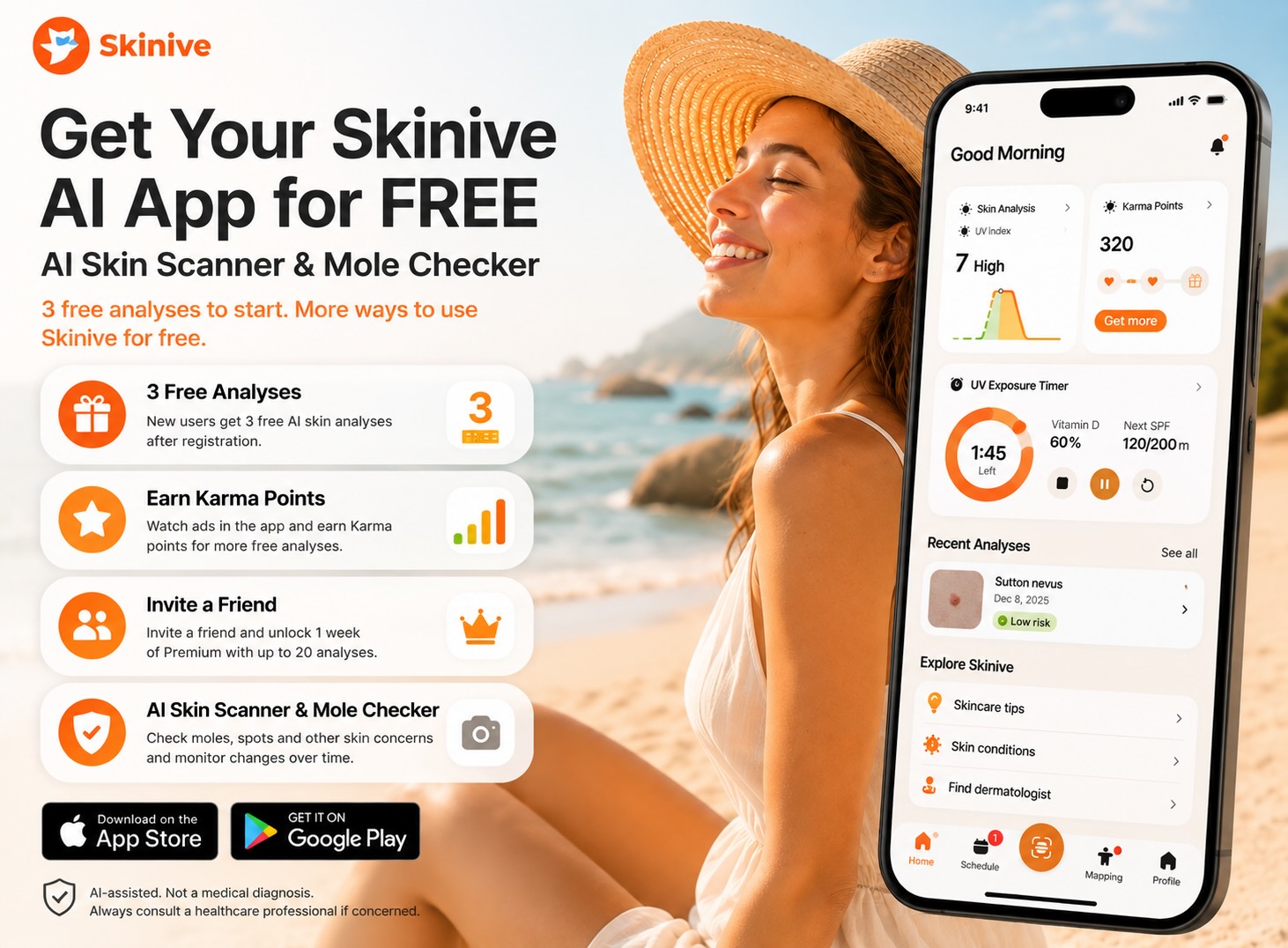
Yes — Skinive is a free-to-download AI skin scanner and mole checker app for iPhone and Android. Every new user gets 3 free AI skin analyses after registration to check a mole, spot or other visible skin concern from a photo.
You can continue getting skin analyses without paying. Earn Karma points in the Skinive app and exchange them for additional free skin checks, or invite a friend to unlock 1 week of Skinive Premium with up to 20 analyses.
Skinive uses AI to analyze the visual characteristics of moles and other visible skin concerns within seconds. You can save previous checks and monitor visible skin changes over time, making Skinive useful not only for a one-time skin check but also for ongoing skin monitoring.
Skinive does not provide a medical diagnosis and does not replace a dermatologist. Any new, changing or concerning mole or skin lesion should be evaluated by a qualified healthcare professional.
Free AI Skin Scanner & Mole Checker — Quick Answer
|
Feature |
Skinive |
|---|---|
|
Free AI skin analyses |
3 free analyses for new users |
|
Free AI skin scanner |
Yes |
|
Free AI mole checker |
Yes |
|
Check a mole from a photo |
Yes |
|
Additional free skin checks |
Yes — with Karma points |
|
Free Premium access |
1 week by inviting a friend |
|
Premium analyses |
Up to 20 analyses per week |
|
Monitor moles and skin changes |
Yes |
|
iPhone app |
Yes |
|
Android app |
Yes |
How to Get Free Skin Analyses with Skinive
There are 3 ways to use the Skinive AI skin scanner without paying.
1. Get 3 Free AI Skin Analyses
Create a Skinive account and receive 3 free skin analyses after registration.
Take a photo of a mole, spot or other visible skin concern with your smartphone and let Skinive AI analyze its visual characteristics within seconds.
2. Earn Karma Points for More Free Skin Checks
Want to continue using the AI skin scanner for free?
You can earn Karma points by completing available reward activities in the Skinive app, including watching ads, and exchange your points for additional skin analyses.
This means your first 3 free analyses are not the only way to perform skin checks without paying.
3. Invite a Friend and Get Premium Free
Invite a friend to try Skinive. When your friend registers through your invitation, you can unlock:
1 week of Skinive Premium with up to 20 skin analyses.
This gives you more opportunities to check and monitor moles and other visible skin concerns without immediately purchasing a subscription.
Real-Time AI Skin Scanner vs Photo Upload
A browser-based skin scanner usually starts after you have already taken a photo. Skinive can start helping before the photo is captured.
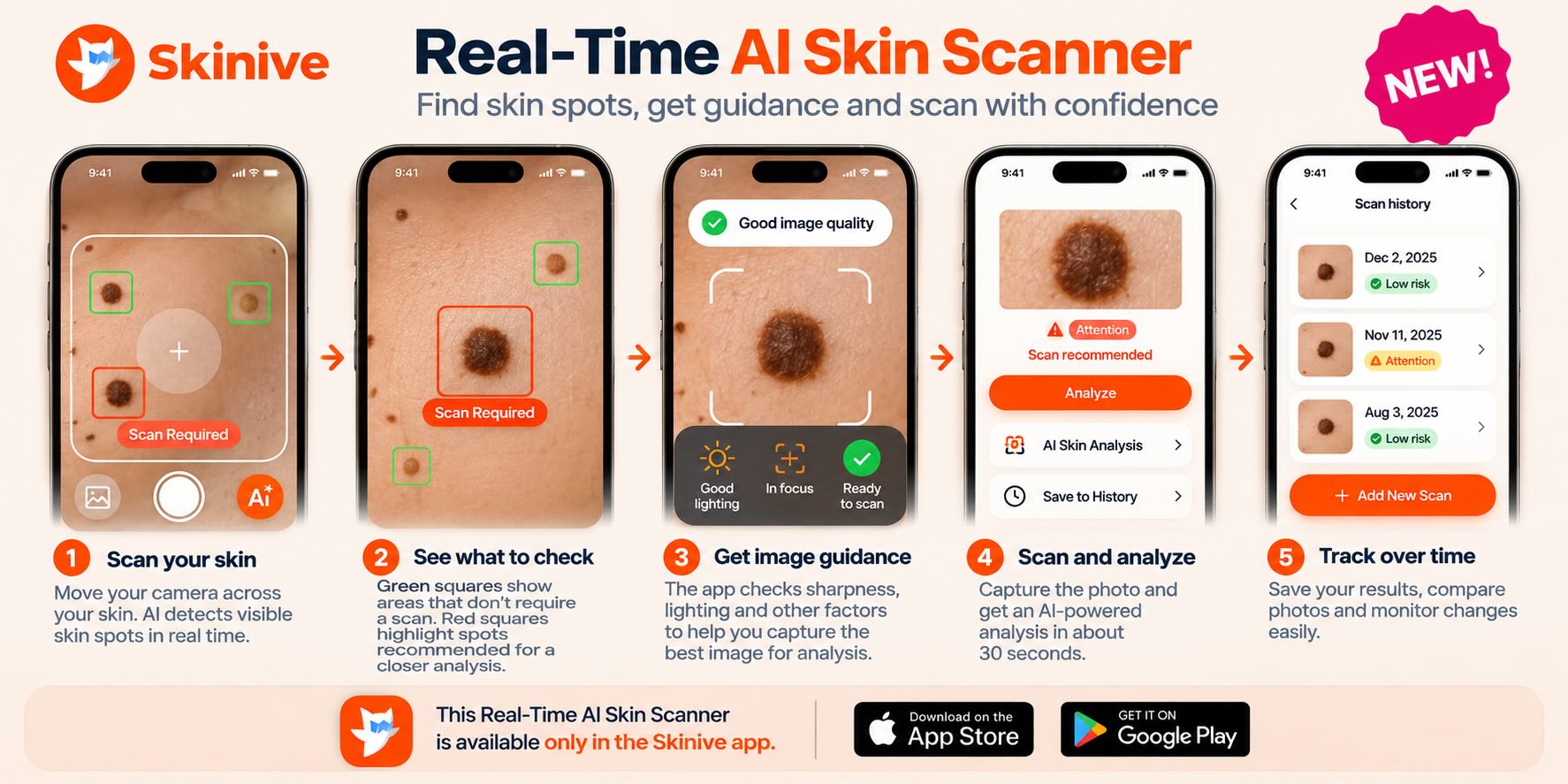
The Skinive app includes a Real-Time AI Skin Scanner that works directly with your smartphone camera. As you move the camera across your skin, AI analyzes the live camera view and highlights visible skin spots, helping you understand which areas may be worth checking more closely.
Areas that do not currently require an additional scan can be highlighted with a green frame, while areas recommended for closer analysis appear with a red frame and a “Scan Required” prompt. This helps guide you toward the skin spots that should receive a full Skinive analysis instead of requiring you to decide on your own which mole or spot to photograph.
AI-Guided Image Capture Before Analysis
Choosing the right skin spot is only part of the process. Image quality also matters for image-based AI analysis.
With a conventional photo-upload workflow, you typically take a picture first and upload it afterwards. If the image is blurry, poorly lit or otherwise unsuitable, the analysis system only receives the photo you have already captured.
Skinive adds guidance during the image-capture stage itself. The app can check important image-quality factors such as sharpness and lighting, helping you capture a more suitable image before running the full AI skin analysis.
This creates a guided scanning workflow:
Point your camera at the skin → AI detects visible skin spots → Areas for closer analysis are highlighted → “Scan Required” guides the next step → Image quality is checked → Capture the photo → Run the AI analysis
Why Is a Real-Time Skin Scanner Different?
The key difference is when AI becomes involved.
A conventional browser-based skin analyzer often follows this workflow:
Take a photo → Open the website → Upload the image → Analyze
With the Skinive mobile app, AI can assist earlier:
Open the scanner → Scan skin in real time → Identify areas for closer analysis → Check image quality → Capture → Analyze → Monitor over time
That means Skinive is not simply an AI photo analyzer. It provides an AI-guided camera workflow designed to help users find skin spots for closer analysis and capture suitable images before the full analysis begins.
Skinive Real-Time Scanner vs Browser Photo Upload
|
Feature |
Typical Photo-Upload Workflow |
Skinive App |
|---|---|---|
|
Analyze a skin photo with AI |
✓ |
✓ |
|
Upload an existing photo |
✓ |
✓ |
|
AI active before taking the photo |
Varies by service |
✓ |
|
Real-time skin scanning through the camera |
Varies by service |
✓ |
|
Highlights visible skin spots while scanning |
Varies by service |
✓ |
|
Highlights areas recommended for closer analysis |
Varies by service |
✓ |
|
“Scan Required” guidance |
Varies by service |
✓ |
|
Image sharpness check |
Varies by service |
✓ |
|
Lighting quality guidance |
Varies by service |
✓ |
|
AI-guided image capture |
Varies by service |
✓ |
|
Monitor skin spots over time |
Varies by service |
✓ |
Features of browser-based skin analysis services vary by provider. The comparison describes a conventional photo-upload workflow rather than every browser-based service.
What Is the Advantage of a Real-Time AI Skin Scanner?
A real-time AI skin scanner can assist before the final skin image is captured. Skinive analyzes the live camera view to highlight visible skin spots and indicate areas that should receive closer analysis. It can also check factors such as image sharpness and lighting during image capture.
This differs from a conventional upload-only skin scanner, where the user typically decides what to photograph and captures or selects the image before the AI analysis begins.
With Skinive, AI helps not only analyze the image — it can also guide you toward what to scan and help you capture a more suitable image for analysis.
Free AI Mole Checker: How Does It Work?
Skinive can also be used as an AI mole checker to examine and monitor visible changes in moles.
Using it is simple:
- Take a photo of the mole or skin area you want to check.
- Let Skinive analyze the image using AI.
- Review the result and information provided by the app.
- Save and monitor the area to keep track of changes over time.
- Consult a healthcare professional if you notice concerning changes or Skinive recommends professional attention.
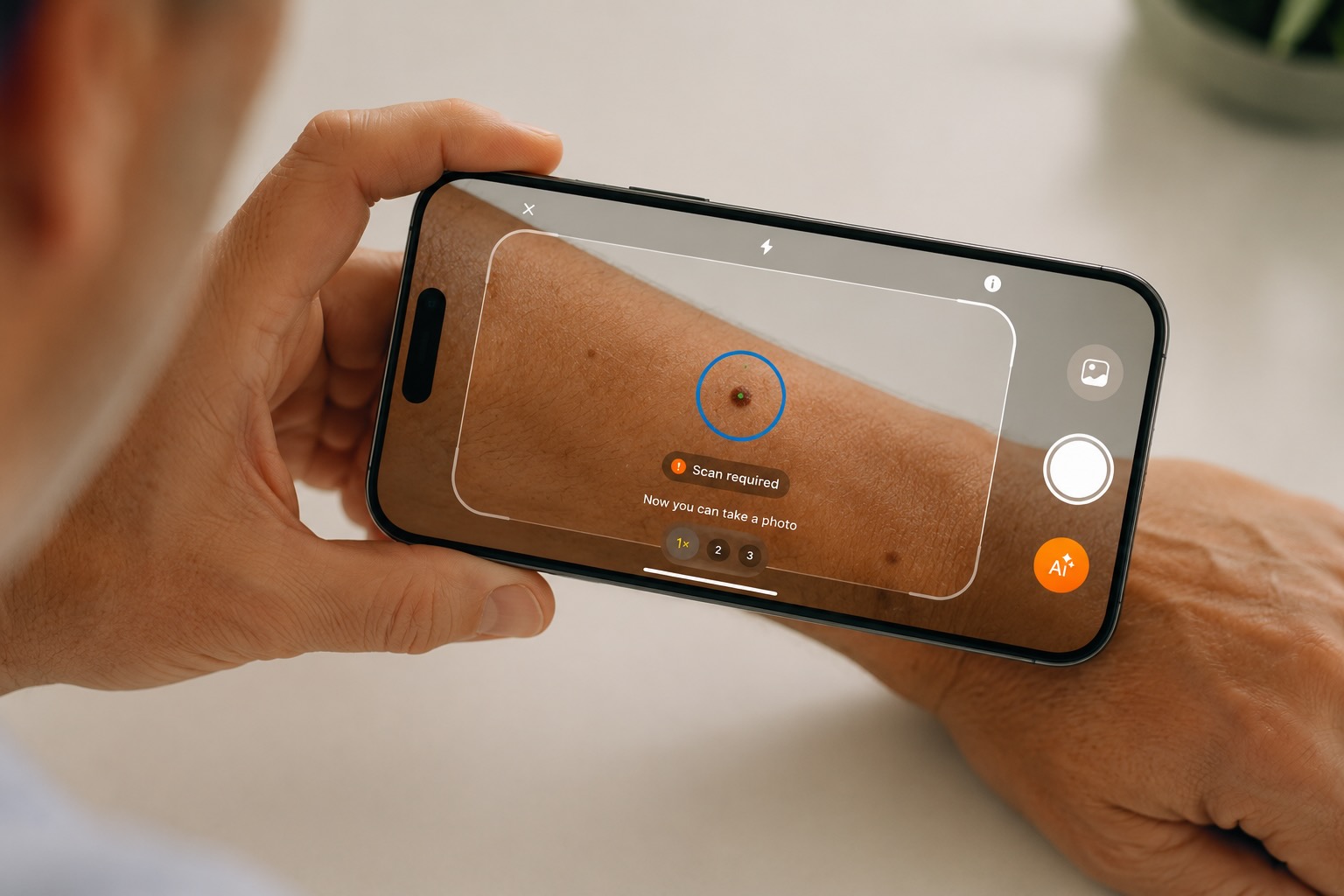
Regular self-checks can help you become more familiar with your skin and notice changes earlier.
Is There a Free Skin Scanner App?
Yes. Skinive is a skin scanner app that can be downloaded for free and includes free AI skin analyses for new users.
Unlike services that require payment before the first check, Skinive lets new users try its AI skin analysis technology with 3 free analyses.
Additional free checks can be earned through Karma points, while the referral program can unlock a week of Premium access.
Skinive is available for both iPhone and Android.
What Can You Check with the Skinive App?
Skinive’s AI can help users assess and monitor the visual characteristics of a wide range of common skin concerns, including:
- moles and pigmented spots;
- acne;
- rashes and irritation;
- dermatitis and eczema;
- psoriasis;
- fungal skin conditions;
- warts and papillomas;
- other visible skin changes.
Skinive should not be used as a substitute for professional medical examination. If a skin lesion is changing, bleeding, painful or otherwise concerning, consult a qualified healthcare professional.
Why Use Skinive as Your AI Skin Scanner?
Skinive combines AI-powered image analysis with tools for ongoing skin monitoring. Skinive technology is used by consumers and healthcare professionals, with more than 1 million users worldwide. Skinive’s medical software is CE-marked in Europe, and its AI has been developed using millions of skin images.
An AI skin scanner should complement — not replace — professional medical care.
Skinive should not be used as a substitute for professional medical examination. If a skin lesion is changing, bleeding, painful or otherwise concerning, consult a qualified healthcare professional.
Can I Use an AI Dermatologist for Free?
People searching for an “AI dermatologist free” are usually looking for a quick way to check a skin concern using artificial intelligence.
Skinive provides AI-assisted skin analysis through its mobile app, including free analyses for new users. You can photograph a visible skin concern and receive an AI assessment within seconds.
However, Skinive is not a dermatologist and does not replace a medical diagnosis or professional consultation.
Think of it as an AI-assisted skin checking and monitoring tool that can help you decide when a skin concern deserves more attention.
Free Skin Scanner Online vs. Skin Scanner App
You may also encounter free skin scanners online that work directly in a web browser.
Skinive uses a mobile app instead. This approach allows you not only to perform an AI skin check but also to save results and monitor skin changes over time from your smartphone.
|
ownload app |
Free |
|
First skin checks |
3 free analyses |
|
AI mole checker |
Yes |
|
AI skin scanner |
Yes |
|
Monitor skin changes |
Yes |
|
Earn additional free analyses |
Yes, with Karma points |
|
Referral reward |
1 week Premium |
|
Premium analyses |
Up to 20/week |
|
iPhone |
Yes |
|
Android |
Yes |
So if you are looking for a free skin scanner app rather than a one-time online check, Skinive gives you several ways to analyze and monitor your skin without immediately purchasing a subscription.
Why Use Skinive as Your AI Skin Scanner?
Skinive combines AI-powered image analysis with tools for ongoing skin monitoring.
Rather than performing only a single skin check, you can use the app to keep track of your skin and return to previously checked areas over time.
Skinive technology is used by both consumers and healthcare professionals, while Skinive’s medical software is CE-marked in Europe.
Most importantly, an AI skin scanner should complement — not replace — professional medical care.
How to Start Your Free Skin Check
Getting started takes only a few minutes:
Step 1 — Download Skinive
Install the Skinive app on your iPhone or Android device.
Step 2 — Create Your Account
Register to receive your 3 free skin analyses.
Step 3 — Take a Photo
Choose the mole, spot or other visible skin concern you want to check and follow the in-app camera guidance.
Step 4 — Get Your AI Analysis
Skinive analyzes the image and provides information about the visible skin concern.
Step 5 — Keep Monitoring Your Skin
Save your checks and use Skinive regularly to monitor visible changes over time.
Frequently Asked Questions
Is there a free AI skin scanner?
Yes. Skinive is free to download and gives new users 3 free AI skin analyses after registration. Additional analyses can be earned using Karma points or through the referral program.
Is there a free mole checker app?
Yes. Skinive can be used as an AI mole checker and includes free analyses for new users. You can photograph and monitor moles and other visible skin changes using your smartphone.
Is the Skinive app completely free?
Skinive is free to download and provides several ways to perform analyses without paying. New users receive 3 free analyses, additional analyses can be obtained with Karma points, and successful friend referrals can unlock a week of Premium. Paid options are also available.
Can I check a mole online for free?
Some mole checker services work directly in a web browser. Skinive works through its iPhone and Android apps instead, allowing you to perform AI-assisted checks and monitor skin areas over time.
Can AI tell if a mole is melanoma?
An AI skin scanner can analyze visual characteristics of a mole, but it cannot replace a dermatologist or confirm a melanoma diagnosis. Any suspicious, new or changing mole should be assessed by a qualified healthcare professional.
Is there a free AI dermatologist?
Skinive provides AI-assisted skin analysis with free checks, but it is not a dermatologist. The app can help you assess and monitor visible skin concerns and determine when professional attention may be appropriate.
Can I identify a skin condition from a photo for free?
Skinive provides free AI-assisted image analyses for new users and can identify visual similarities with supported skin conditions. Its results are informational and should not be considered a medical diagnosis.
Is Skinive available for Android and iPhone?
Yes. The Skinive app is available for both Android and iOS devices.
Start Your Free AI Skin Check
Download Skinive and get 3 free skin analyses. Check moles and other visible skin concerns with AI, monitor changes over time, and earn additional analyses through Skinive’s free-use options.